

Hf-native ColVision Models
Collection
Models that can be used with the native transformers 🤗 implementation instead of colpali-engine. • 4 items • Updated • 8
This version of ColQwen2 should be loaded with the
transformers 🤗release or Sentence Transformers, not withcolpali-engine. It was converted using theconvert_colqwen2_weights_to_hf.pyscript from thevidore/colqwen2-v1.0-mergedcheckpoint.
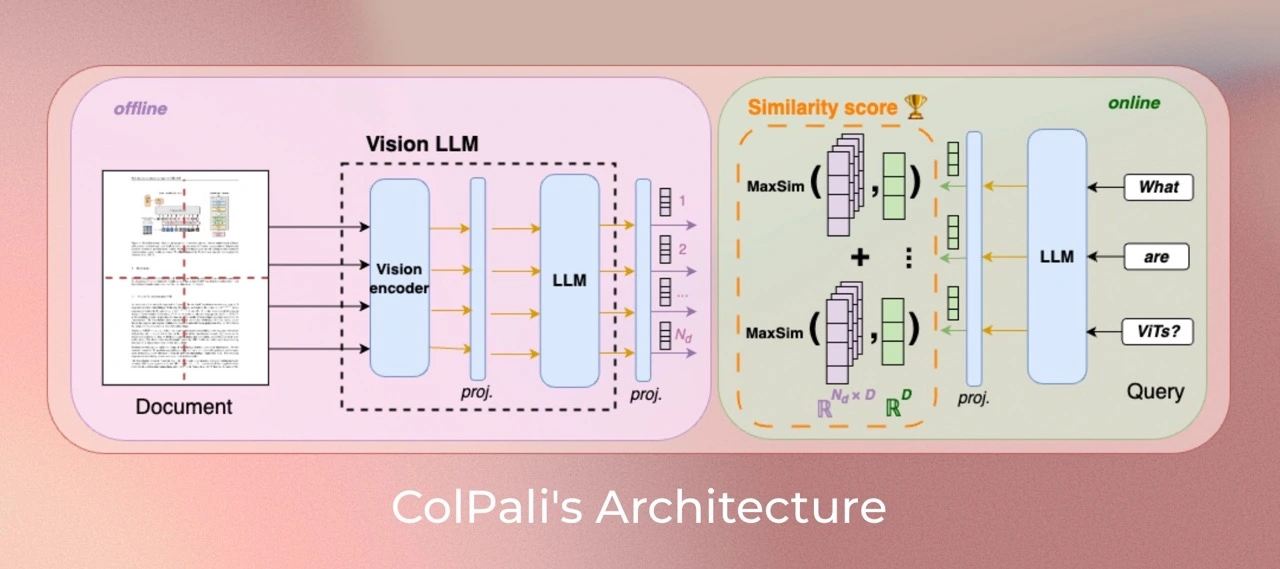
ColQwen2 is a model based on a novel model architecture and training strategy based on Vision Language Models (VLMs) to efficiently index documents from their visual features. It is a Qwen2-VL-2B extension that generates ColBERT- style multi-vector representations of text and images. It was introduced in the paper ColPali: Efficient Document Retrieval with Vision Language Models and first released in this repository
The HuggingFace transformers 🤗 implementation was contributed by Tony Wu (@tonywu71) and Yoni Gozlan (@yonigozlan).
Read the transformers 🤗 model card: https://huggingface.co/docs/transformers/en/model_doc/colqwen2.
Our training dataset of 127,460 query-page pairs is comprised of train sets of openly available academic datasets (63%) and a synthetic dataset made up of pages from web-crawled PDF documents and augmented with VLM-generated (Claude-3 Sonnet) pseudo-questions (37%). Our training set is fully English by design, enabling us to study zero-shot generalization to non-English languages. We explicitly verify no multi-page PDF document is used both ViDoRe and in the train set to prevent evaluation contamination. A validation set is created with 2% of the samples to tune hyperparameters.
ColQwen2 can be used as a multi-vector (ColBERT-style late interaction) retriever with Sentence Transformers via the MultiVectorEncoder:
pip install "sentence-transformers[image]>=6.0.0"
from sentence_transformers import MultiVectorEncoder

model = MultiVectorEncoder("vidore/colqwen2-v1.0-hf")

queries = [
    "What is the variable represented on the y-axis of the graph?",
    "Total outlay is maximum in which year?",
]
images = [
    "https://huggingface.co/datasets/sentence-transformers/example-documents/resolve/main/doc1.jpg",
    "https://huggingface.co/datasets/sentence-transformers/example-documents/resolve/main/doc2.jpg",
    "https://huggingface.co/datasets/sentence-transformers/example-documents/resolve/main/doc3.jpg",
    "https://huggingface.co/datasets/sentence-transformers/example-documents/resolve/main/doc4.jpg",
]

query_embeddings = model.encode_query(queries)
document_embeddings = model.encode_document(images)
print(f"Query 0 shape:    {tuple(query_embeddings[0].shape)}")
print(f"Document 0 shape: {tuple(document_embeddings[0].shape)}")
# Query 0 shape:    (26, 128)
# Document 0 shape: (755, 128)

# MaxSim late-interaction scoring (rows = queries, columns = images)
scores = model.similarity(query_embeddings, document_embeddings)
print(scores)
# tensor([[14.9668, 11.8184, 12.5811, 11.7061],
#         [ 8.2715, 16.3750,  7.7480,  7.2578]])
import requests
import torch
from PIL import Image

from transformers import ColQwen2ForRetrieval, ColQwen2Processor
from transformers.utils.import_utils import is_flash_attn_2_available


# Load the model and the processor
model_name = "vidore/colqwen2-v1.0-hf"

model = ColQwen2ForRetrieval.from_pretrained(
    model_name,
    torch_dtype=torch.bfloat16,
    device_map="auto",  # "cpu", "cuda", or "mps" for Apple Silicon
    attn_implementation="flash_attention_2" if is_flash_attn_2_available() else "sdpa",
)
processor = ColQwen2Processor.from_pretrained(model_name)

# The document page screenshots from your corpus
url1 = "https://upload.wikimedia.org/wikipedia/commons/8/89/US-original-Declaration-1776.jpg"
url2 = "https://upload.wikimedia.org/wikipedia/commons/thumb/4/4c/Romeoandjuliet1597.jpg/500px-Romeoandjuliet1597.jpg"

images = [
    Image.open(requests.get(url1, stream=True).raw),
    Image.open(requests.get(url2, stream=True).raw),
]

# The queries you want to retrieve documents for
queries = [
    "When was the United States Declaration of Independence proclaimed?",
    "Who printed the edition of Romeo and Juliet?",
]

# Process the inputs
inputs_images = processor(images=images).to(model.device)
inputs_text = processor(text=queries).to(model.device)

# Forward pass
with torch.no_grad():
    image_embeddings = model(**inputs_images).embeddings
    query_embeddings = model(**inputs_text).embeddings

# Score the queries against the images
scores = processor.score_retrieval(query_embeddings, image_embeddings)

print("Retrieval scores (query x image):")
print(scores)
If you have issue with loading the images with PIL, you can use the following code to create dummy images:
images = [
    Image.new("RGB", (128, 128), color="white"),
    Image.new("RGB", (64, 32), color="black"),
]
ColQwen2's vision language backbone model (Qwen2-VL) is under apache-2.0 license. ColQwen2 inherits from this apache-2.0 license.
If you use any datasets or models from this organization in your research, please cite the original dataset as follows:
@misc{faysse2024colpaliefficientdocumentretrieval,
  title={ColPali: Efficient Document Retrieval with Vision Language Models},
  author={Manuel Faysse and Hugues Sibille and Tony Wu and Bilel Omrani and Gautier Viaud and Céline Hudelot and Pierre Colombo},
  year={2024},
  eprint={2407.01449},
  archivePrefix={arXiv},
  primaryClass={cs.IR},
  url={https://arxiv.org/abs/2407.01449},
}