# Image2Text: ComfyUI workflows (Comfy Cloud and local)
Describe an image in enough detail that the reply works as a text-to-image prompt: the subjects, where they are in the frame and how they interact, their anatomy, pose and facial expressions, the setting and the light. Built on ComfyUI's template **Qwen3-VL: Text Generation**, with a system prompt for prompt-ready descriptions, and optimised for Apple MLX in the MLX version.
## Highlights
- 📝 **Prompt-ready descriptions** — a **System prompt** asks for everything a text-to-image model needs to draw the picture again; edit it once to change every description
- 🍏 **About 3× faster on a Mac** — the MLX version runs Qwen3-VL 4B and its vision tower on Apple MLX through LVNodes: about 85 tokens/s on an M2 Ultra, a 330-word description in about 7 s, where ComfyUI's own path takes about 23 s
- 🧠 **Any vision LLM** — Qwen3-VL, Qwen3.5 / 3.6 / 3.8, Gemma 4 and Gemma 3 through ComfyUI; on MLX also ComfyUI's int8 / int6 / int4 files and any MLX model folder that mlx-vlm runs (Gemma 3 / 4, Qwen-VL, Llama 4, Mistral 3, Phi-4 and more), mixture-of-experts models included
- 🎯 **The same reading of the image** — on MLX, ComfyUI still prepares the image exactly as for its own path: with sampling off, Gemma 4 E4B gave the same description word for word on both
- ☁️ **Comfy Cloud: nothing to install** — the template's model is in Comfy Cloud's library
- 🧩 **Small and readable** — the template's four nodes plus a System prompt, a Seed and an image preview, an App view with every field, and a Note that explains them
## Screenshots
From Comfy Cloud (the local workflows look the same, with LVNodes' labels on the panel's last two fields). Click a picture to open it full size.
[](assets/comfyui_cloud_001.jpg)
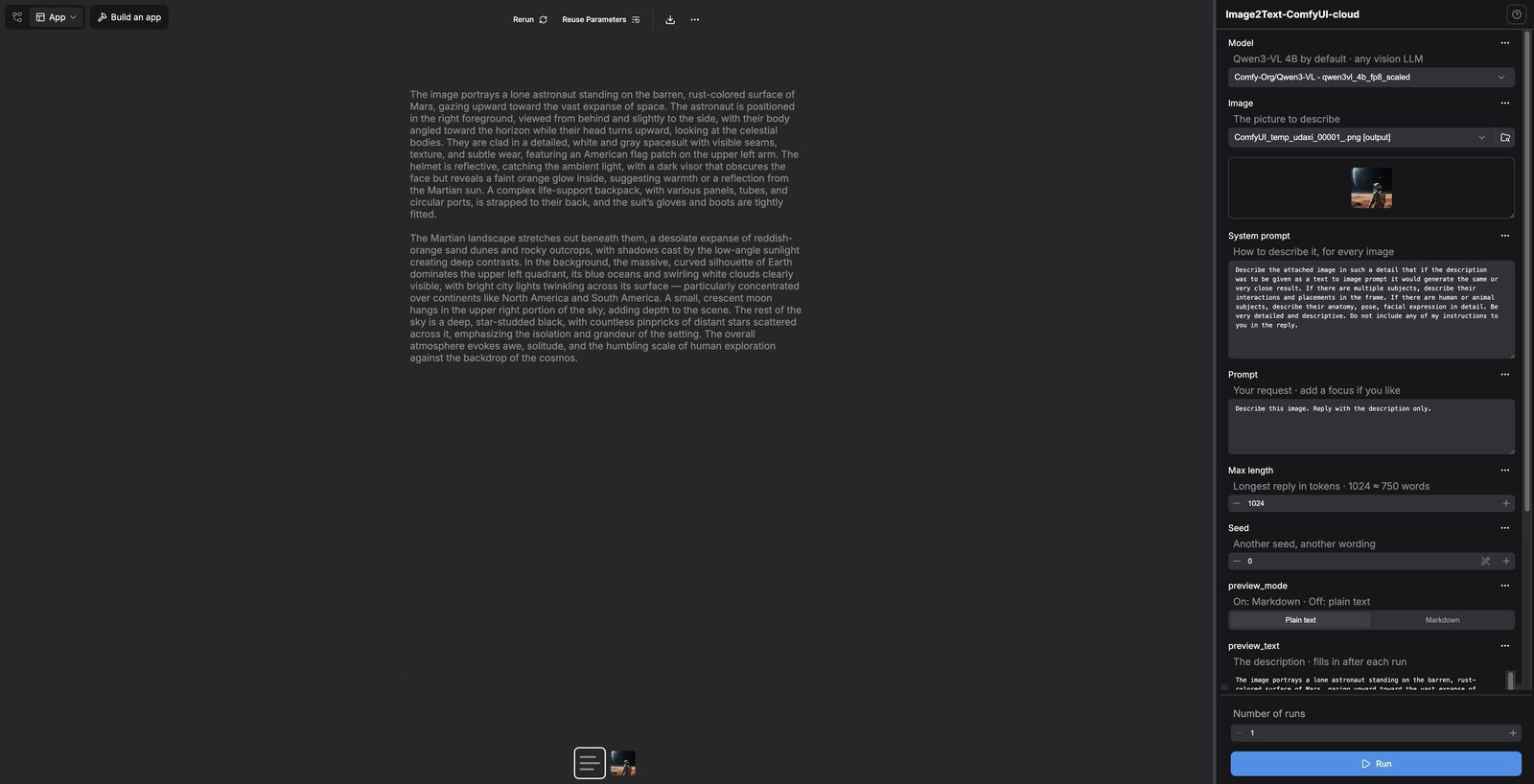
*The App view on Comfy Cloud: the inputs on the right, from Model (Qwen3-VL 4B, `qwen3vl_4b_fp8_scaled`) down to the Markdown switch (`preview_mode`) and the description box (`preview_text`), which fills in after each run. A run has two results under the picture: the description (the text icon) and the image it describes, shown here.*
[](assets/comfyui_cloud_002.jpg)
*The same run with the description selected: the reply in the middle, ready to copy as a text-to-image prompt, and saved as a text file in the outputs.*
[](assets/comfyui_cloud_003.jpg)
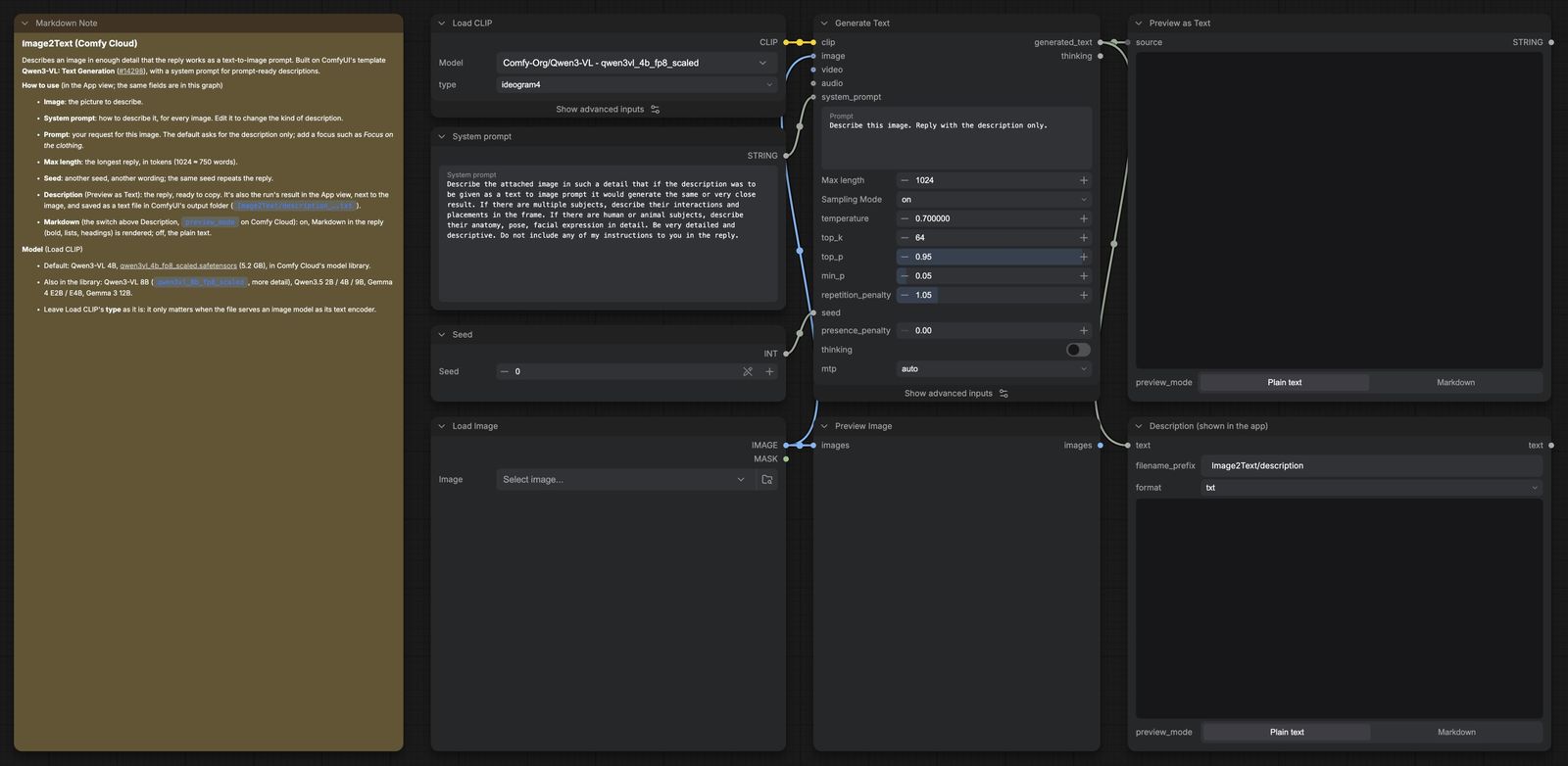
*The graph view: the Notes on the left, then the inputs (Load CLIP, System prompt, Seed, Load Image), Generate Text over the Preview Image, and the two text outputs, the Description box (Preview as Text) over the saved Description (Save Text). Load Image opens with no picture chosen.*
## Three versions
| File | Runs on | Loads the model with |
|---|---|---|
| `Image2Text-ComfyUI-cloud.json` | Comfy Cloud | Load CLIP: `qwen3vl_4b_fp8_scaled` (the template's) |
| `Image2Text-ComfyUI-local.json` | local ComfyUI: NVIDIA, Apple GPUs, CPU (PyTorch) | Load CLIP: `qwen3vl_4b_bf16` |
| `Image2Text-ComfyUI-local-MLX.json` | local ComfyUI on an Apple Silicon Mac (Apple MLX) | LVNodes' **Load LLM (MLX)**: `qwen3vl_4b_bf16` |
All three are the same graph: **Load Image**, a **System prompt** and a **Seed** go into **Generate Text**, whose reply shows in **Preview as Text** and is saved by **Save Text**. They open in the **App view**: Model, Image, System prompt, Prompt, Max length and Seed on the right, and the reply in **Description** (the Preview as Text box) as soon as it's written. The run's result in the middle is the description itself (a `.txt` saved in `Image2Text/` in ComfyUI's output folder), with the image as a second result next to it. On Comfy Cloud the Description box is labelled `preview_text`; the "Description" label comes from LVNodes.
## Install on Comfy Cloud
1. Download [Image2Text-ComfyUI-cloud.json](https://huggingface.co/lvladikov/ComfyUI-Nodes-and-Workflows/resolve/main/Image2Text/Image2Text-ComfyUI-cloud.json?download=true).
2. Drag it onto the Comfy Cloud canvas, then save it.
3. Upload your image in the **Image** field (it opens with none chosen) and run. The model is in Comfy Cloud's library, so there's nothing to import.
## Install on local ComfyUI
1. **ComfyUI 0.39 or newer.** The local version uses ComfyUI's own nodes only; it needs no custom nodes.
2. **Model** → `models/text_encoders/`: [qwen3vl_4b_bf16.safetensors](https://huggingface.co/Comfy-Org/Qwen3-VL/resolve/main/text_encoders/qwen3vl_4b_bf16.safetensors) (8.9 GB). It's the same file as Krea 2's text encoder, so with Krea 2 installed you already have it. When you open the workflow, ComfyUI offers to download it if it's missing. Smaller, for NVIDIA GPUs: [qwen3vl_4b_fp8_scaled.safetensors](https://huggingface.co/Comfy-Org/Qwen3-VL/resolve/main/text_encoders/qwen3vl_4b_fp8_scaled.safetensors) (5.2 GB; pick it in **Load CLIP**).
3. Open `Image2Text-ComfyUI-local.json`, pick your image in the **Image** field and run. It opens with no image chosen, so there's no missing file to flag.
On an Apple Silicon Mac, use the MLX version below: same model, about 3× faster.
## Apple MLX version (local, Apple Silicon)
`Image2Text-ComfyUI-local-MLX.json` swaps Load CLIP for LVNodes' **Load LLM (MLX)**, which runs the model and its vision tower on the Mac's GPU with Apple MLX.
1. **LVNodes:** copy the `LVNodes` folder into `ComfyUI/custom_nodes/` and restart ComfyUI (see the [root README](../README.md#lvnodes); to update, copy what's inside the new `LVNodes` into your existing one). The first MLX run sets up LVNodes' own MLX environment: about 1.3 GB, a few minutes, once. ComfyUI's own packages aren't touched.
2. **Model** → `models/text_encoders/`: [qwen3vl_4b_bf16.safetensors](https://huggingface.co/Comfy-Org/Qwen3-VL/resolve/main/text_encoders/qwen3vl_4b_bf16.safetensors) (8.9 GB). It's re-quantized to MLX 8-bit as it loads: about 5 GB in memory.
3. Open the workflow, pick your image and run.
**Load LLM (MLX)** lists two kinds of models:
- **ComfyUI text encoders** in `models/text_encoders`, with ComfyUI's own chat template: Qwen3-VL 4B / 8B / 32B, Qwen3.5 / 3.6 / 3.8 (dense, or A3B mixture-of-experts), Gemma 4 E2B / E4B / 31B; bf16, or ComfyUI's int8 / int6 / int4. **Settings › LVNodes › MLX LLM** sets the precision: Auto runs int4 and int6 files at MLX 6-bit, int8 and bf16 at 8-bit.
- **MLX model folders** in `models/LLM` (a folder, or a link to one), with the folder's own chat template, image processing and quantization: any model mlx-vlm runs, such as Gemma 3 / 4, Qwen2.5-VL / Qwen3-VL / Qwen3.5 / 3.6, Llama 4, Mistral 3, Phi-4, SmolVLM or InternVL.
Measured on an M2 Ultra (64 GB), describing the same 832×1024 photo (load: the first run; the model stays loaded for the next):
| Model | Load | Memory | Speed |
|---|---:|---:|---:|
| Qwen3-VL 4B, bf16 file (MLX 8-bit), the default | 8 s | 5.1 GB | 86–90 tokens/s |
| Qwen3-VL 4B, int8 file | 5 s | 5.1 GB | 90 tokens/s |
| Qwen3.5 4B, int8 file | 5 s | 5.1 GB | 85 tokens/s |
| Gemma 4 E4B, bf16 or int8 file | 12–16 s | 8.3 GB | 63–66 tokens/s |
| Qwen3.8 27B, int4 file (MLX 6-bit) | 40 s | 22.8 GB | 23 tokens/s |
| Qwen3-VL 32B, int4 file (MLX 6-bit) | 38 s | 27.8 GB | 20 tokens/s |
| Qwen3.6 35B-A3B (mixture-of-experts), int4 file (MLX 6-bit) | 70 s | 29.1 GB | 58 tokens/s |
| Qwen3.6 35B-A3B, MLX 4-bit folder | 8 s | 21.1 GB | 73 tokens/s |
| Gemma 4 26B-A4B, MLX 6-bit folder | 14 s | 21.8 GB | 62 tokens/s |
For comparison, ComfyUI's own path (Load CLIP on the Apple GPU, the local version) wrote a 325-word description with the bf16 Qwen3-VL 4B in 22.7 s; the MLX version took 6.6 s for 336 words.
## Using it
- **Image:** the picture to describe.
- **System prompt:** how to describe it, for every image. The default:
> Describe the attached image in such a detail that if the description was to be given as a text to image prompt it would generate the same or very close result. If there are multiple subjects, describe their interactions and placements in the frame. If there are human or animal subjects, describe their anatomy, pose, facial expression in detail. Be very detailed and descriptive. Do not include any of my instructions to you in the reply.
- **Prompt:** your request for this image. The default, *Describe this image. Reply with the description only.*, keeps small models from adding a heading such as "Prompt:". Add a focus if you like: *Focus on the clothing.*
- **Max length:** the longest reply, in tokens (1024 ≈ 750 words). A reply that reaches it stops mid-sentence; raise it for longer descriptions.
- **Seed:** another seed, another wording. The same seed repeats the reply, so a rerun with nothing changed gives the same text.
- **Description** (the Preview as Text box) shows the reply; select and copy it from there. The same text is the run's result in the middle, and saved as `Image2Text/description_….txt` in ComfyUI's output folder.
- **Markdown** (the switch above Description, labelled `preview_mode` on Comfy Cloud): on, Markdown in the reply (bold, lists, headings) is rendered; off, the plain text. Locally LVNodes switches it on when the workflow opens and renders the result in the middle as Markdown too. On Comfy Cloud it starts on Plain text, because ComfyUI doesn't save the switch with the workflow, so turn it on there; the result in the middle stays plain text, as ComfyUI draws text results.
Leave Load CLIP's **type** as it is. It only matters when the file serves an image model as its text encoder; for these vision LLMs Generate Text works the same with any of them except the image-model ones (such as krea2 or flux2), which change the prompt template or drop the vision tower.
Bigger models see more: on the test photo, a woman feeding a dog on a park bench, Gemma 4 E4B had the dog "standing on all four paws", while Qwen3-VL 4B and the 26B to 35B models saw it on its hind legs, paws on her knee.
## Licence
The workflows are part of this project and under the [Apache License 2.0](../LICENSE). They're based on ComfyUI's template **Qwen3-VL: Text Generation** (`llm_qwen3vl_text_gen.json`, [Comfy-Org/ComfyUI#14298](https://github.com/Comfy-Org/ComfyUI/pull/14298)), with a system prompt added and, in the MLX version, LVNodes' MLX loader. The models aren't part of the project: Qwen3-VL and Qwen3.5 are Apache-2.0, and every other model is under its own licence, which its model card states.