

Krea 2 / Z-Image - Both Turbo and Raw/Base apps and workflows release with tones of app features and improvements
Browse filesUpdated ComfyUI apps (Cloud / local / Apple MLX): Krea 2 now does Turbo and Raw (28+ steps, CFG 4.5, negative prompt), there's a new Z-Image app (Turbo + Base, with 2/4/8-step LoRAs for Base), picking a model sets its recommended settings, and MLX runs now show live step previews.
- .gitattributes +17 -0
- Krea-2/Krea-2-ComfyUI-cloud.json +0 -0
- Krea-2/Krea-2-ComfyUI-local-MLX.json +0 -0
- Krea-2/Krea-2-ComfyUI-local.json +0 -0
- Krea-2/LICENSE.pdf +3 -0
- Krea-2/README.md +315 -0
- Krea-2/assets/comfyui_cloud_001.jpg +3 -0
- Krea-2/assets/comfyui_local_mlx_001.jpg +3 -0
- Krea-2/assets/comfyui_local_mlx_002.jpg +3 -0
- Krea-2/assets/comfyui_local_mlx_003.jpg +3 -0
- Krea-2/assets/comfyui_local_mlx_004.jpg +3 -0
- Krea-2/assets/thumbs/comfyui_cloud_001.jpg +3 -0
- Krea-2/assets/thumbs/comfyui_local_mlx_001.jpg +0 -0
- Krea-2/assets/thumbs/comfyui_local_mlx_002.jpg +3 -0
- Krea-2/assets/thumbs/comfyui_local_mlx_003.jpg +3 -0
- Krea-2/assets/thumbs/comfyui_local_mlx_004.jpg +0 -0
- README.md +32 -23
- Z-Image/README.md +201 -0
- Z-Image/Z-Image-ComfyUI-cloud.json +0 -0
- Z-Image/Z-Image-ComfyUI-local-MLX.json +0 -0
- Z-Image/Z-Image-ComfyUI-local.json +0 -0
- Z-Image/assets/comfyui_cloud_001.jpg +3 -0
- Z-Image/assets/comfyui_local_mlx_001.jpg +3 -0
- Z-Image/assets/comfyui_local_mlx_002.jpg +3 -0
- Z-Image/assets/comfyui_local_mlx_003.jpg +3 -0
- Z-Image/assets/comfyui_local_mlx_004.jpg +3 -0
- Z-Image/assets/thumbs/comfyui_cloud_001.jpg +3 -0
- Z-Image/assets/thumbs/comfyui_local_mlx_001.jpg +0 -0
- Z-Image/assets/thumbs/comfyui_local_mlx_002.jpg +3 -0
- Z-Image/assets/thumbs/comfyui_local_mlx_003.jpg +3 -0
- Z-Image/assets/thumbs/comfyui_local_mlx_004.jpg +0 -0
- meta.yaml +15 -8
.gitattributes
CHANGED
|
@@ -45,3 +45,20 @@ Krea-2-Turbo/assets/thumbs/comfyui_cloud_001.jpg filter=lfs diff=lfs merge=lfs -
|
|
| 45 |
Krea-2-Turbo/assets/thumbs/comfyui_local_mlx_002.jpg filter=lfs diff=lfs merge=lfs -text
|
| 46 |
Krea-2-Turbo/assets/thumbs/comfyui_local_mlx_003.jpg filter=lfs diff=lfs merge=lfs -text
|
| 47 |
Krea-2-Turbo/assets/thumbs/comfyui_local_mlx_004.jpg filter=lfs diff=lfs merge=lfs -text
|
|
|
|
|
|
|
|
|
|
|
|
|
|
|
|
|
|
|
|
|
|
|
|
|
|
|
|
|
|
|
|
|
|
|
|
|
|
|
|
|
|
|
|
|
|
|
|
|
|
|
|
|
|
| 45 |
Krea-2-Turbo/assets/thumbs/comfyui_local_mlx_002.jpg filter=lfs diff=lfs merge=lfs -text
|
| 46 |
Krea-2-Turbo/assets/thumbs/comfyui_local_mlx_003.jpg filter=lfs diff=lfs merge=lfs -text
|
| 47 |
Krea-2-Turbo/assets/thumbs/comfyui_local_mlx_004.jpg filter=lfs diff=lfs merge=lfs -text
|
| 48 |
+
Krea-2/assets/comfyui_cloud_001.jpg filter=lfs diff=lfs merge=lfs -text
|
| 49 |
+
Krea-2/assets/comfyui_local_mlx_001.jpg filter=lfs diff=lfs merge=lfs -text
|
| 50 |
+
Krea-2/assets/comfyui_local_mlx_002.jpg filter=lfs diff=lfs merge=lfs -text
|
| 51 |
+
Krea-2/assets/comfyui_local_mlx_003.jpg filter=lfs diff=lfs merge=lfs -text
|
| 52 |
+
Krea-2/assets/comfyui_local_mlx_004.jpg filter=lfs diff=lfs merge=lfs -text
|
| 53 |
+
Krea-2/assets/thumbs/comfyui_cloud_001.jpg filter=lfs diff=lfs merge=lfs -text
|
| 54 |
+
Krea-2/assets/thumbs/comfyui_local_mlx_002.jpg filter=lfs diff=lfs merge=lfs -text
|
| 55 |
+
Krea-2/assets/thumbs/comfyui_local_mlx_003.jpg filter=lfs diff=lfs merge=lfs -text
|
| 56 |
+
Krea-2/LICENSE.pdf filter=lfs diff=lfs merge=lfs -text
|
| 57 |
+
Z-Image/assets/comfyui_cloud_001.jpg filter=lfs diff=lfs merge=lfs -text
|
| 58 |
+
Z-Image/assets/comfyui_local_mlx_001.jpg filter=lfs diff=lfs merge=lfs -text
|
| 59 |
+
Z-Image/assets/comfyui_local_mlx_002.jpg filter=lfs diff=lfs merge=lfs -text
|
| 60 |
+
Z-Image/assets/comfyui_local_mlx_003.jpg filter=lfs diff=lfs merge=lfs -text
|
| 61 |
+
Z-Image/assets/comfyui_local_mlx_004.jpg filter=lfs diff=lfs merge=lfs -text
|
| 62 |
+
Z-Image/assets/thumbs/comfyui_cloud_001.jpg filter=lfs diff=lfs merge=lfs -text
|
| 63 |
+
Z-Image/assets/thumbs/comfyui_local_mlx_002.jpg filter=lfs diff=lfs merge=lfs -text
|
| 64 |
+
Z-Image/assets/thumbs/comfyui_local_mlx_003.jpg filter=lfs diff=lfs merge=lfs -text
|
Krea-2/Krea-2-ComfyUI-cloud.json
ADDED
|
The diff for this file is too large to render.
See raw diff
|
|
|
Krea-2/Krea-2-ComfyUI-local-MLX.json
ADDED
|
The diff for this file is too large to render.
See raw diff
|
|
|
Krea-2/Krea-2-ComfyUI-local.json
ADDED
|
The diff for this file is too large to render.
See raw diff
|
|
|
Krea-2/LICENSE.pdf
ADDED
|
@@ -0,0 +1,3 @@
|
|
|
|
|
|
|
|
|
|
|
|
|
| 1 |
+
version https://git-lfs.github.com/spec/v1
|
| 2 |
+
oid sha256:b82a2805162bde714a4eb27b9063c4fc3345d08a30be055134a6160e5430ba74
|
| 3 |
+
size 137711
|
Krea-2/README.md
ADDED
|
@@ -0,0 +1,315 @@
|
|
|
|
|
|
|
|
|
|
|
|
|
|
|
|
|
|
|
|
|
|
|
|
|
|
|
|
|
|
|
|
|
|
|
|
|
|
|
|
|
|
|
|
|
|
|
|
|
|
|
|
|
|
|
|
|
|
|
|
|
|
|
|
|
|
|
|
|
|
|
|
|
|
|
|
|
|
|
|
|
|
|
|
|
|
|
|
|
|
|
|
|
|
|
|
|
|
|
|
|
|
|
|
|
|
|
|
|
|
|
|
|
|
|
|
|
|
|
|
|
|
|
|
|
|
|
|
|
|
|
|
|
|
|
|
|
|
|
|
|
|
|
|
|
|
|
|
|
|
|
|
|
|
|
|
|
|
|
|
|
|
|
|
|
|
|
|
|
|
|
|
|
|
|
|
|
|
|
|
|
|
|
|
|
|
|
|
|
|
|
|
|
|
|
|
|
|
|
|
|
|
|
|
|
|
|
|
|
|
|
|
|
|
|
|
|
|
|
|
|
|
|
|
|
|
|
|
|
|
|
|
|
|
|
|
|
|
|
|
|
|
|
|
|
|
|
|
|
|
|
|
|
|
|
|
|
|
|
|
|
|
|
|
|
|
|
|
|
|
|
|
|
|
|
|
|
|
|
|
|
|
|
|
|
|
|
|
|
|
|
|
|
|
|
|
|
|
|
|
|
|
|
|
|
|
|
|
|
|
|
|
|
|
|
|
|
|
|
|
|
|
|
|
|
|
|
|
|
|
|
|
|
|
|
|
|
|
|
|
|
|
|
|
|
|
|
|
|
|
|
|
|
|
|
|
|
|
|
|
|
|
|
|
|
|
|
|
|
|
|
|
|
|
|
|
|
|
|
|
|
|
|
|
|
|
|
|
|
|
|
|
|
|
|
|
|
|
|
|
|
|
|
|
|
|
|
|
|
|
|
|
|
|
|
|
|
|
|
|
|
|
|
|
|
|
|
|
|
|
|
|
|
|
|
|
|
|
|
|
|
|
|
|
|
|
|
|
|
|
|
|
|
|
|
|
|
|
|
|
|
|
|
|
|
|
|
|
|
|
|
|
|
|
|
|
|
|
|
|
|
|
|
|
|
|
|
|
|
|
|
|
|
|
|
|
|
|
|
|
|
|
|
|
|
|
|
|
|
|
|
|
|
|
|
|
|
|
|
|
|
|
|
|
|
|
|
|
|
|
|
|
|
|
|
|
|
|
|
|
|
|
|
|
|
|
|
|
|
|
|
|
|
|
|
|
|
|
|
|
|
|
|
|
|
|
|
|
|
|
|
|
|
|
|
|
|
|
|
|
|
|
|
|
|
|
|
|
|
|
|
|
|
|
|
|
|
|
|
|
|
|
|
|
|
|
|
|
|
|
|
|
|
|
|
|
|
|
|
|
|
|
|
|
|
|
|
|
|
|
|
|
|
|
|
|
|
|
|
|
|
|
|
|
|
|
|
|
|
|
|
|
|
|
|
|
|
|
|
|
|
|
|
|
|
|
|
|
|
|
|
|
|
|
|
|
|
|
|
|
|
|
|
|
|
|
|
|
|
|
|
|
|
|
|
|
|
|
|
|
|
|
|
|
|
|
|
|
|
|
|
|
|
|
|
|
|
|
|
|
|
|
|
|
|
|
|
|
|
|
|
|
|
|
|
|
|
|
|
|
|
|
|
|
|
|
|
|
|
|
|
|
|
|
|
|
|
|
|
|
|
|
|
|
|
|
|
|
|
|
|
|
|
|
|
|
|
|
|
|
|
|
|
|
|
|
|
|
|
|
|
|
|
|
|
|
|
|
|
|
|
|
|
|
|
|
|
|
|
|
|
|
|
|
|
|
|
|
|
|
|
|
|
|
|
|
|
|
|
|
|
|
|
|
|
|
|
|
|
|
|
|
|
|
|
|
|
|
|
|
|
|
|
|
|
|
|
|
|
|
|
|
|
|
|
|
|
|
|
|
|
|
|
|
|
|
|
|
|
|
|
|
|
|
|
|
|
|
|
|
|
|
|
|
|
|
|
|
|
|
|
|
|
|
|
|
|
|
|
|
|
|
|
|
|
|
|
|
|
|
|
|
|
|
|
|
|
|
|
|
|
|
|
|
|
|
|
|
|
|
|
|
|
|
|
|
|
|
|
| 1 |
+
# Krea 2: ComfyUI workflows (Comfy Cloud and local)
|
| 2 |
+
|
| 3 |
+
A ComfyUI workflow and app for **[Krea 2 Turbo](https://huggingface.co/krea/Krea-2-Turbo)** and **[Krea 2 Raw](https://huggingface.co/krea/Krea-2-Raw)** in one: a **Model** switch picks either, with a negative prompt, CFG and the distill LoRAs [Krea2-Turbo-Distill-2step-LoRA](https://huggingface.co/lvladikov/Krea2-Turbo-Distill-2step-LoRA) and [Krea2-Turbo-Distill-4step-LoRA](https://huggingface.co/lvladikov/Krea2-Turbo-Distill-4step-LoRA) (trained on and for Turbo; on Raw just for personal experimentation).
|
| 4 |
+
|
| 5 |
+
This folder is part of [ComfyUI Nodes and Workflows](../README.md), whose README covers the setup every workflow there shares: LVNodes, KJNodes, model downloads and general Mac tips.
|
| 6 |
+
|
| 7 |
+
## Highlights
|
| 8 |
+
|
| 9 |
+
- 🖼️ **One app, three editions** — Comfy Cloud, local ComfyUI (PyTorch) and Apple MLX share one App view: about 20 inputs, the full graph behind it, and Notes inside that explain every input
|
| 10 |
+
- 🌀 **Krea 2 Turbo and Krea 2 Raw** — one **Model** switch away: Turbo, distilled, in 4 steps (the default), or Raw, the undistilled base model, at 28+ steps and CFG 4.5 (Krea's own: 52 at 3.5), with a **Negative prompt**; each with its own sampling shift, as Krea's schedulers set it
|
| 11 |
+
- 🎛️ **Settings follow the model (local)** — pick Krea 2 Raw and Steps, Enable step LoRAs and CFG switch to 28, off and 4.5 on the spot; pick Turbo and they go back to 4, on and 1 (with Step LoRA strength 1.0). What the fields show is what runs, and you can change any of them afterwards. It's a page add-on in LVNodes, and Comfy Cloud only runs the node packs it has installed itself, so it can't load it; on Cloud you set those fields by hand, and their hints give the same values
|
| 12 |
+
- ⚡ **Steps choose the speed** — 2–3 steps run the [2-step LoRA](https://huggingface.co/lvladikov/Krea2-Turbo-Distill-2step-LoRA) (fast), 4–6 the [4-step LoRA](https://huggingface.co/lvladikov/Krea2-Turbo-Distill-4step-LoRA) (fair), 7+ the native model (best), switched inside the graph; with **Enable step LoRAs** off, the native model runs at any step count. The step LoRAs were trained on and for Krea 2 Turbo; on Raw they're only for personal experimentation (they run there up to 27 steps), with their own **Step LoRA strength**
|
| 13 |
+
- 🎲 **Fully Random that's really random** — the seed draws the material (locally from 2,217 scenes, 1,474 animals, 1,238 cities, 1,084 professions and more, or four of about 14,000 WordNet nouns; on Cloud from One Button Prompt), then the Prompt LLM writes one photorealistic 50–70-word prompt from it; the same seed gives the same prompt
|
| 14 |
+
- 📚 **Random from Dataset** — real, human-written prompts: locally the **full** datasets, 3M+ prompts read live from Hugging Face one row per run with nothing downloaded, plus any public dataset you name; on Cloud 5,230 cleaned samples built in
|
| 15 |
+
- 🗣️ **Prompt enhancement with any LLM** — Qwen3-VL 4B by default, the same file as Krea's text encoder so nothing extra to download; Qwen3, Qwen 3.5, Gemma 3 and Gemma 4 work too
|
| 16 |
+
- 🛟 **Never an empty or refused prompt** — reasoning and `<think>` blocks are stripped; when the LLM refuses or returns nothing, enhancement falls back to your prompt and Fully Random asks again with the next seed, twice, before a fixed prompt; nothing is filtered
|
| 17 |
+
- 🎨 **Extra LoRA** — any style LoRA on top of the step LoRA, with its own strength (0 = off, try 0.8–1.0) and trigger words added after enhancement, so they reach the image exactly as typed; None by default, and skipped entirely when None
|
| 18 |
+
- 📐 **Resolution presets** — square, landscape and portrait from 1 MP to 4 MP, read from the label so you can add your own; Custom takes any width × height
|
| 19 |
+
- 🔍 **Upscaling** — SeedVR2 7B sharp, or a classic 4x-UltraSharp / RealESRGAN x4, at any factor: a 3.5 MP image at 4× comes out at 8864×6624; off by default, and only the chosen upscaler's model loads
|
| 20 |
+
- 📊 **Live progress and previews in the app (local)** — a status line above Run names each stage (writing the prompt, encoding, generating, upscaling), counts the steps with s/it and the time left, ends with "Done in m:ss" and shows how many runs are queued; the picture forms step by step as it samples (on MLX sharp with LightTAE, `lighttaew2_1.safetensors`, in `models/vae_approx`; PyTorch shows ComfyUI's own previews)
|
| 21 |
+
- 📝 **Prompt used** — the exact prompt that was rendered, trigger words included, shown next to the image and saved as a small .txt
|
| 22 |
+
- 🎯 **A new picture on the first run** — ComfyUI repeats the saved seed on the first run after a workflow opens; LVNodes rolls a fresh one locally, and Cloud's Fully Random draws fresh ingredients on every run
|
| 23 |
+
- 🔥 **Local PyTorch: half the memory on Apple Silicon (MPS), unchanged on NVIDIA** — the local workflow runs on any GPU ComfyUI supports; on Apple GPUs, through PyTorch's MPS backend, its step LoRA runs alongside Krea instead of keeping a second copy of its weights: memory while sampling 48 → 24 GB, loading onto the GPU 37 → 17 s, a full test run 125 → 101 s, same picture (M2 Ultra, 1 MP, 4 steps)
|
| 24 |
+
- 🚀 **Krea 2 on Apple MLX** — the whole model runs on MLX inside ComfyUI, from ComfyUI's own bf16 files. Running the LoRAs alongside instead of baking them in, keeping the model for the rest of a batch and remembering each LoRA's layer matches took a 1 MP run from 69–74 s to 55–60 s, each later image of a batch to about 41 s, and peak memory from 51 to 35 GB (M2 Ultra, 4 steps); Krea 2 Raw runs on MLX too, at about 18 s per step at 1024²
|
| 25 |
+
- 🧠 **One stage in memory at a time** — Wait For gates load each model only when its stage starts (Prompt LLM → text encoder → Krea → upscaler), so with `--cache-none` the models never pile up
|
| 26 |
+
- 📌 **Keep models loaded, on demand (local)** — a checkbox above Run keeps Krea and the text encoder between runs, whatever ComfyUI's startup flags: a run took 76 s instead of 120 s when memory allowed
|
| 27 |
+
- 📥 **Models download themselves** — every file carries its download link for ComfyUI's missing-models dialog, and only the files a run actually uses need to exist
|
| 28 |
+
- 🧩 **A tidy graph** — every app field starts in one Fields → Set column, and the groups read their values through Set/Get pills, aligned with even gaps: no wire runs from one group to another
|
| 29 |
+
- ☁️ **Cloud or local** — Cloud needs no installs (just import the two LoRAs) and defaults to 3.5 MP; local needs LVNodes and KJNodes (plus, for MLX, a one-off automatic install of its MLX packages on the first run), reads the full datasets live, adds Custom HF dataset, defaults to 1 MP, and brings the status line, Keep models loaded and settings that follow the Model choice (all from LVNodes, which Comfy Cloud can't load)
|
| 30 |
+
|
| 31 |
+
## Screenshots
|
| 32 |
+
|
| 33 |
+
From the Apple MLX workflow (the local PyTorch workflow looks the same), and one from Comfy Cloud. Click a picture to open it full size.
|
| 34 |
+
|
| 35 |
+
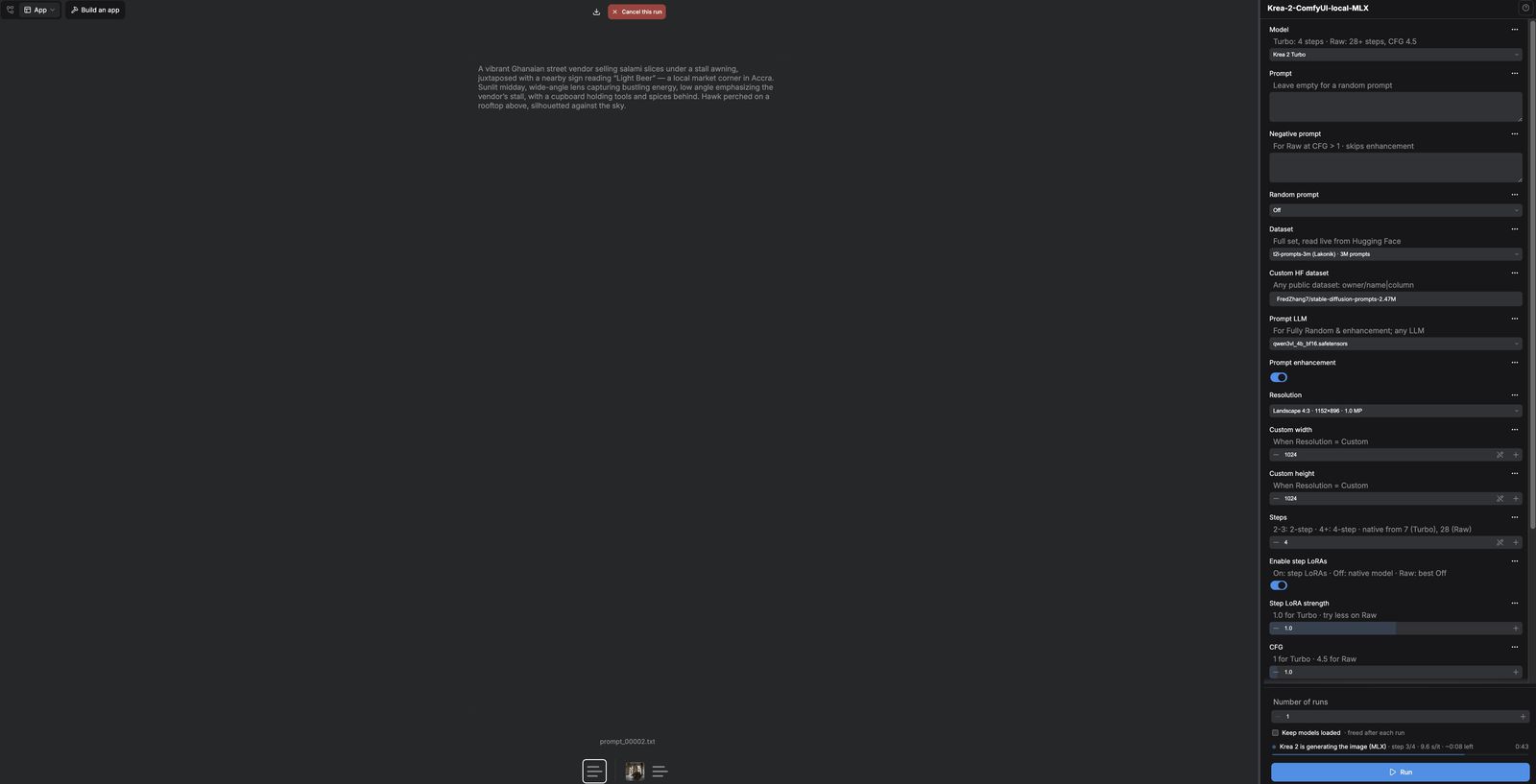
[](assets/comfyui_local_mlx_001.jpg)<br>
|
| 36 |
+
*App view during a run (Apple MLX workflow). The Prompt is empty, so the run falls back to Fully Random and the Prompt LLM has written the prompt shown in the middle; the status line above Run follows the stages, here Krea 2 generating the image, step 3 of 4 at 9.6 s per step, after 43 s. The app's inputs are on the right, from Model (Krea 2 Turbo) at the top down to Enable step LoRAs, Step LoRA strength and CFG, with Keep models loaded just above Run.*
|
| 37 |
+
|
| 38 |
+
[](assets/comfyui_local_mlx_002.jpg)<br>
|
| 39 |
+
*The finished image from the same run: Krea 2 Turbo at 1 MP (Landscape 4:3, 1152×896), 4 steps with the 4-step LoRA, done in 1:04 on an M2 Ultra. Rerun and Reuse Parameters sit above the image, and earlier results in the strip below it.*
|
| 40 |
+
|
| 41 |
+
[](assets/comfyui_local_mlx_003.jpg)<br>
|
| 42 |
+
*Graph view. The Notes on the left explain the setup and every input; the Krea 2 (MLX) node in the middle holds all the fields, including the ones the app hides (the Turbo and Raw model files, the step LoRAs, quantization); on the right are the image preview and Prompt used, the exact prompt that was rendered.*
|
| 43 |
+
|
| 44 |
+
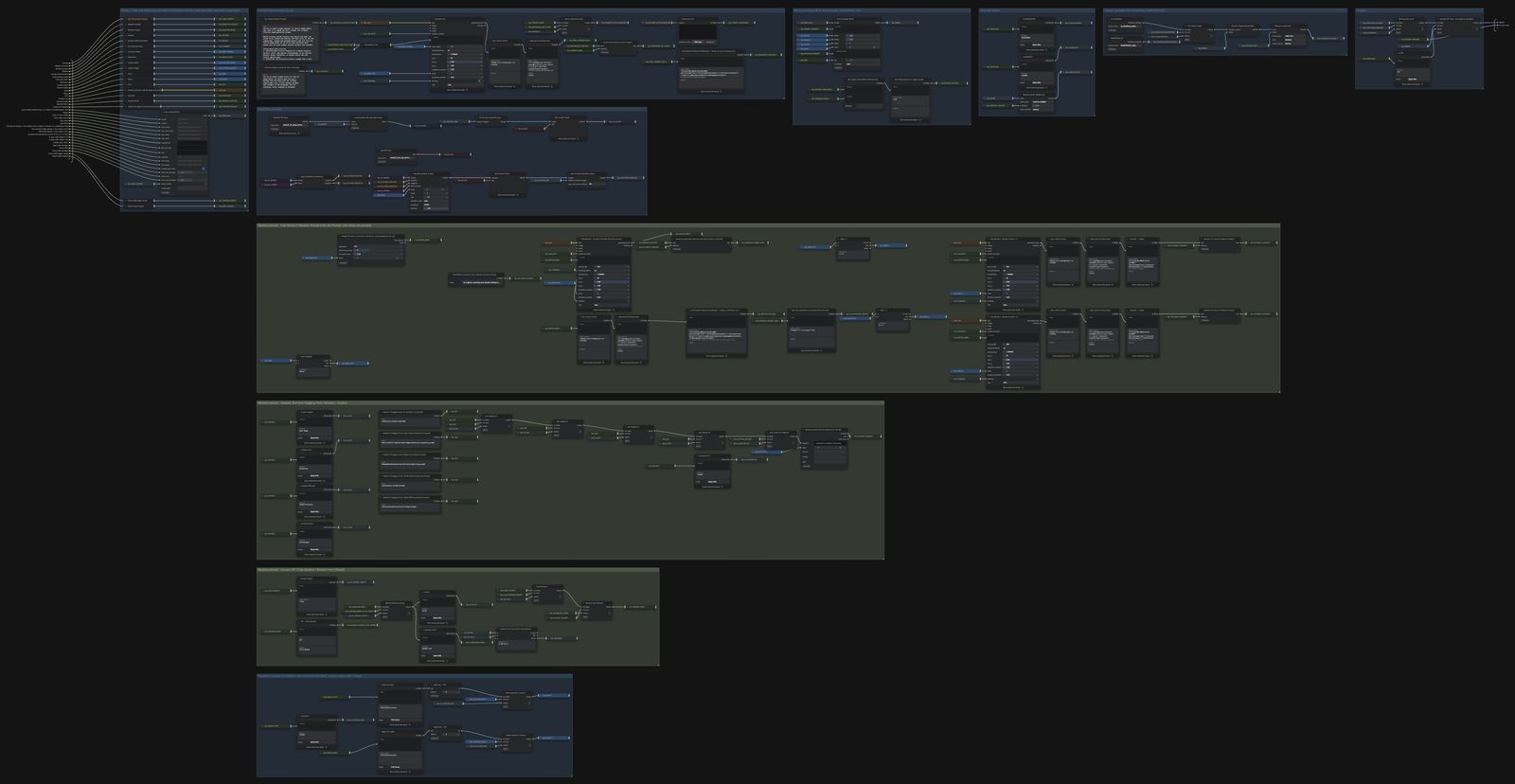
[](assets/comfyui_local_mlx_004.jpg)<br>
|
| 45 |
+
*Inside the Krea 2 subgraph. Every field starts in the Fields → Set column on the far left: one field node per field, each followed by a KJNodes Set pill. Each group reads what it needs through Get pills, so no wire runs from one group to another. Top row: prompt enhancement, Krea 2 on MLX, the upscaler choice, the classic upscaler and the output; below them SeedVR2, the random prompt groups and Resolution.*
|
| 46 |
+
|
| 47 |
+
[](assets/comfyui_cloud_001.jpg)<br>
|
| 48 |
+
*Comfy Cloud, with the **Model** list open (Krea 2 Turbo or Krea 2 Raw): Krea 2 Turbo at 4 steps, your own prompt enhanced by the Prompt LLM, Landscape 4:3 at 3.5 MP (2216×1656), upscaled 2x to 4432×3312. Cloud runs the same workflow without LVNodes, so its app has no status line or Keep models loaded.*
|
| 49 |
+
|
| 50 |
+
## Two versions
|
| 51 |
+
|
| 52 |
+
| | **Comfy Cloud** | **Local ComfyUI** (Desktop, portable or manual install) |
|
| 53 |
+
|---|---|---|
|
| 54 |
+
| How to get it | Download [Krea-2-ComfyUI-cloud.json](https://huggingface.co/lvladikov/ComfyUI-Nodes-and-Workflows/resolve/main/Krea-2/Krea-2-ComfyUI-cloud.json?download=true) and drag it onto Comfy Cloud | `Krea-2-ComfyUI-local.json` |
|
| 55 |
+
| Random from Dataset | Cleaned samples built into the workflow: 5,230 prompts across 5 datasets | The **full** datasets, read live from Hugging Face (3M+ prompts), plus **any** public HF dataset via Custom HF dataset |
|
| 56 |
+
| Extra installs | None | [LVNodes](../README.md#lvnodes) and [KJNodes](../README.md#kjnodes) |
|
| 57 |
+
| Models | Already on Comfy Cloud, Krea 2 Raw included, except the two LoRAs (import them once) | Local files. ComfyUI offers to download any that are missing. |
|
| 58 |
+
| Internet | Not applicable (it runs in the cloud) | Only for Random from Dataset |
|
| 59 |
+
|
| 60 |
+
On Apple Silicon Macs there is also a local version that runs Krea 2 on MLX: see [Apple MLX version](#apple-mlx-version-local-apple-silicon).
|
| 61 |
+
|
| 62 |
+
Both versions have the same app inputs, except that the local one adds **Custom HF dataset**. Two things behave differently. The local version skips Prompt enhancement for Fully Random prompts, which the Prompt LLM has already written. It also defaults to 1 MP instead of Cloud's 3.5 MP.
|
| 63 |
+
|
| 64 |
+
## Install on Comfy Cloud
|
| 65 |
+
|
| 66 |
+
1. **Open the workflow:** download [Krea-2-ComfyUI-cloud.json](https://huggingface.co/lvladikov/ComfyUI-Nodes-and-Workflows/resolve/main/Krea-2/Krea-2-ComfyUI-cloud.json?download=true), drag it onto the Comfy Cloud canvas, and save it to your workflows.
|
| 67 |
+
2. **Import the two LoRAs (once):** when the workflow opens, Comfy Cloud lists them under **Setup required → Missing Models**. For each LoRA, click its 🔗 icon (it copies the LoRA's link), then **Import**, paste the link and click **Continue**. Cloud imports the LoRA and selects it in the workflow. Cloud can't fill in the link by itself, which is why you paste it. These are the links:
|
| 68 |
+
- [4-step LoRA](https://huggingface.co/lvladikov/Krea2-Turbo-Distill-4step-LoRA/resolve/main/krea2_turbo_4step_rank_64_lora_comfyui.safetensors?download=true)
|
| 69 |
+
- [2-step LoRA](https://huggingface.co/lvladikov/Krea2-Turbo-Distill-2step-LoRA/resolve/main/krea2_turbo_2step_rank_64_lora_comfyui.safetensors?download=true)
|
| 70 |
+
|
| 71 |
+
You can also paste them into **Import** in the model library. Cloud then names them `lvladikov__Krea2-Turbo-Distill-4step-LoRA__…` and `lvladikov__Krea2-Turbo-Distill-2step-LoRA__…`, which is what the workflow expects. The Krea 2 node's **2-step LoRA** and **4-step LoRA** fields pick the step LoRAs, and their lists show the LoRAs in your Comfy Cloud library, so if your imports have other names, pick them there.
|
| 72 |
+
3. **Run it:** use the **App** view. Every other model, Krea 2 Raw included, is already on Comfy Cloud.
|
| 73 |
+
|
| 74 |
+
## Install on local ComfyUI
|
| 75 |
+
|
| 76 |
+
Beyond a standard ComfyUI install, the local workflow needs:
|
| 77 |
+
|
| 78 |
+
1. **ComfyUI v0.38 or newer**: ComfyUI Desktop, the portable build or a manual (git) install. Older versions lack nodes the workflow relies on: Krea 2 support, Generate Text with a system prompt, SeedVR2, and the text / regex / switch nodes.
|
| 79 |
+
2. **[LVNodes](../README.md#lvnodes) and [KJNodes](../README.md#kjnodes)**, installed as the project README describes. KJNodes provides the Set/Get pills that wire the graph. From LVNodes, this workflow uses:
|
| 80 |
+
- `ComfyUI-Random-Prompt-HF-Dataset`: **Random Prompt (HF Dataset)**, which reads the datasets for Random from Dataset.
|
| 81 |
+
- `ComfyUI-Random-Prompt-Local`: **Random Prompt (Local lists)**, which draws the random brief for Fully Random (see [Fully Random, in depth](#fully-random-in-depth)).
|
| 82 |
+
- `ComfyUI-Workflow-Helpers`, four small nodes:
|
| 83 |
+
- **Text to Int:** Resolution's width and height.
|
| 84 |
+
- **Text or Fallback:** uses your prompt when the enhancement LLM returns nothing, without making anything run twice.
|
| 85 |
+
- **Text or Fallback (lazy):** the Fully Random retry: when the Prompt LLM's reply is empty or a refusal, it asks again with the next seed, and that second attempt only runs when needed.
|
| 86 |
+
- **Wait For:** loads each big model only when its stage starts, which saves memory (see [Tips for Apple Silicon Macs](#tips-for-apple-silicon-macs)).
|
| 87 |
+
- `ComfyUI-Keep-Loaded` for Krea and the two Qwen3-VL loaders (text encoder and Prompt LLM): ComfyUI's loaders plus the **Keep models loaded** switch (see [Keep models loaded](#keep-models-loaded)).
|
| 88 |
+
- `ComfyUI-Optional-Loaders` for the upscalers, the step LoRAs and the Extra LoRA. These loaders work like ComfyUI's own, but they only need their files when a run uses them. With **Upscale model** Off, you don't need any upscaler files, and the Extra LoRA loader also offers **None**, its default. On Apple Silicon the LoRA loader runs the LoRA alongside Krea instead of merging it (see [Faster on Apple Silicon, unchanged elsewhere](#faster-on-apple-silicon-unchanged-elsewhere)).
|
| 89 |
+
- The **status line above Run** in App Mode (`LVNodes/web`). While a run is in progress, it shows which stage the run is in (Prompt LLM, text encoder, Krea, upscaler) and the time so far, then "Done in m:ss". It also shows Krea's steps with their speed and the time left, as tqdm does in a terminal, e.g. "step 2/4 · 9.5 s/it · ~0:19 left", and the Prompt LLM's speed, e.g. "92 tokens · 16.2 tokens/s". Comfy Cloud can't load add-ons like this, so the Cloud version doesn't have it.
|
| 90 |
+
|
| 91 |
+
**WAS Node Suite isn't needed.** Earlier versions used it, but its requirements pin an old OpenCV (4.7) that breaks current ComfyUI installs, which use NumPy 2. If installing it has already downgraded your OpenCV, upgrade OpenCV again in ComfyUI's Python, for example `python -m pip install "opencv-python-headless>=4.13"`. Use a version from 4.13 on, because 4.12 forces NumPy below 2.3.
|
| 92 |
+
3. **Models.** None ship with ComfyUI, not even the upscalers. When you open the workflow, ComfyUI offers to download the ones it can't find (see [Models](../README.md#models)). **On a Mac, skip the fp8 Krea model and text encoder the dialog offers.** Get the bf16 or int8 versions listed under the table instead, and select them as described in [If the Krea 2 node shows an Error](#if-the-krea-2-node-shows-an-error). To get the files yourself:
|
| 93 |
+
|
| 94 |
+
| Model | Put it in | Size | Download |
|
| 95 |
+
|---|---|---|---|
|
| 96 |
+
| Krea 2 Turbo | `models/diffusion_models/` | 13.1 GB | [krea2_turbo_fp8_scaled.safetensors](https://huggingface.co/Comfy-Org/Krea-2/resolve/main/diffusion_models/krea2_turbo_fp8_scaled.safetensors) |
|
| 97 |
+
| Krea 2 Raw (only for **Model** Krea 2 Raw) | `models/diffusion_models/` | 13.1 GB | [krea2_raw_fp8_scaled.safetensors](https://huggingface.co/Comfy-Org/Krea-2/resolve/main/diffusion_models/krea2_raw_fp8_scaled.safetensors) |
|
| 98 |
+
| Qwen3-VL 4B text encoder (also the default Prompt LLM) | `models/text_encoders/` | 5.2 GB | [qwen3vl_4b_fp8_scaled.safetensors](https://huggingface.co/Comfy-Org/Krea-2/resolve/main/text_encoders/qwen3vl_4b_fp8_scaled.safetensors) |
|
| 99 |
+
| Qwen-Image VAE | `models/vae/` | 0.25 GB | [qwen_image_vae.safetensors](https://huggingface.co/Comfy-Org/Krea-2/resolve/main/vae/qwen_image_vae.safetensors) |
|
| 100 |
+
| **4-step LoRA**: fair quality, at Steps 4-6 | `models/loras/` | 0.44 GB | [krea2_turbo_4step_rank_64_lora_comfyui.safetensors](https://huggingface.co/lvladikov/Krea2-Turbo-Distill-4step-LoRA/resolve/main/krea2_turbo_4step_rank_64_lora_comfyui.safetensors?download=true) |
|
| 101 |
+
| **2-step LoRA**: reasonably good quality but faster, at Steps 2-3 | `models/loras/` | 0.44 GB | [krea2_turbo_2step_rank_64_lora_comfyui.safetensors](https://huggingface.co/lvladikov/Krea2-Turbo-Distill-2step-LoRA/resolve/main/krea2_turbo_2step_rank_64_lora_comfyui.safetensors?download=true) |
|
| 102 |
+
| SeedVR2 7B sharp (SeedVR2 upscaler) | `models/diffusion_models/` | 16.5 GB | [seedvr2_7b_sharp_fp16.safetensors](https://huggingface.co/Comfy-Org/SeedVR2/resolve/main/diffusion_models/seedvr2_7b_sharp_fp16.safetensors) |
|
| 103 |
+
| SeedVR2 VAE | `models/vae/` | 0.5 GB | [seedvr2_ema_vae_fp16.safetensors](https://huggingface.co/Comfy-Org/SeedVR2/resolve/main/vae/seedvr2_ema_vae_fp16.safetensors) |
|
| 104 |
+
| 4x-UltraSharp | `models/upscale_models/` | 0.07 GB | [4x-UltraSharp.safetensors](https://huggingface.co/Kim2091/UltraSharp/resolve/main/4x-UltraSharp.safetensors) |
|
| 105 |
+
| RealESRGAN x4 | `models/upscale_models/` | 0.07 GB | [RealESRGAN_x4plus.safetensors](https://huggingface.co/Comfy-Org/Real-ESRGAN_repackaged/resolve/main/RealESRGAN_x4plus.safetensors) |
|
| 106 |
+
|
| 107 |
+
- **Other versions, for Apple Silicon Macs or to fit your memory:** the fp8 files above are the defaults, meant for NVIDIA GPUs; they don't run well on Apple's GPU backend. You can download other versions into the same folders instead and select them on the **Krea 2** node under **Krea 2 Turbo model**, **Krea 2 Raw model**, **clip_name** and **Prompt LLM**. Choose by the memory you have:
|
| 108 |
+
- **bf16**, full precision and the most memory: [krea2_turbo_bf16.safetensors](https://huggingface.co/Comfy-Org/Krea-2/resolve/main/diffusion_models/krea2_turbo_bf16.safetensors) (26.3 GB), [krea2_raw_bf16.safetensors](https://huggingface.co/Comfy-Org/Krea-2/resolve/main/diffusion_models/krea2_raw_bf16.safetensors) (26.3 GB) and [qwen3vl_4b_bf16.safetensors](https://huggingface.co/Comfy-Org/Krea-2/resolve/main/text_encoders/qwen3vl_4b_bf16.safetensors) (8.9 GB).
|
| 109 |
+
- **int8**, about half the memory of bf16, and it runs on Apple Silicon: [krea2_turbo_int8_convrot.safetensors](https://huggingface.co/Comfy-Org/Krea-2/resolve/main/diffusion_models/krea2_turbo_int8_convrot.safetensors) (13.5 GB) and [krea2_raw_int8_convrot.safetensors](https://huggingface.co/Comfy-Org/Krea-2/resolve/main/diffusion_models/krea2_raw_int8_convrot.safetensors). There is no official int8 text encoder, but community int8 versions of Qwen3-VL 4B exist on Hugging Face.
|
| 110 |
+
- **Krea 2 Raw is optional:** only needed when you choose **Model** Krea 2 Raw. With Krea 2 Turbo, the default, the workflow runs without it.
|
| 111 |
+
- **The upscalers are optional.** Their files are only needed for the upscaler you choose in **Upscale model**. With it Off, the default, the workflow runs without any of them, so you can skip them in the download dialog. SeedVR2 7B is large, so the classic upscalers are a lighter start.
|
| 112 |
+
- **Same models under other names:** pick your files in the loaders. The two LoRAs, both Krea models, the text encoder, the VAE and the Prompt LLM are also selectable on the **Krea 2** node.
|
| 113 |
+
4. **Optional: a Hugging Face token** makes Random from Dataset less likely to be rate-limited, and lets it read gated datasets you have access to. See [the project README](../README.md#optional-a-hugging-face-token) for how to set it.
|
| 114 |
+
5. **Run it:** drag `Krea-2-ComfyUI-local.json` into ComfyUI and use the **App** view. Random from Dataset needs an internet connection; everything else runs offline.
|
| 115 |
+
|
| 116 |
+
### If the Krea 2 node shows an Error
|
| 117 |
+
|
| 118 |
+
The workflow is set up for the fp8 versions of the Krea model and the text encoder: `krea2_turbo_fp8_scaled.safetensors` and `qwen3vl_4b_fp8_scaled.safetensors`. If you don't have those files, the **Krea 2** node shows **Error**, with **Krea 2 Turbo model**, **clip_name** and **Prompt LLM** in red. **Krea 2 Raw model** shows red as well while its file is missing, but the workflow runs without it as long as **Model** is Krea 2 Turbo.
|
| 119 |
+
|
| 120 |
+
You don't need to download the fp8 files if you already have another version. On the Krea 2 node (graph view), pick the files you have in those dropdowns, for example the bf16 versions `krea2_turbo_bf16.safetensors` and `qwen3vl_4b_bf16.safetensors`, or the int8 `krea2_turbo_int8_convrot.safetensors`. The error clears once all three point to files you have.
|
| 121 |
+
|
| 122 |
+
## Tips for Apple Silicon Macs
|
| 123 |
+
|
| 124 |
+
Start with the [general Mac tips](../README.md#tips-for-apple-silicon-macs) on `--gpu-only` and `--cache-none`. For Krea 2:
|
| 125 |
+
|
| 126 |
+
- **Use the bf16 or int8 models.** The fp8 files don't run well on Apple's GPU backend (see the models step above). int8 needs about half the memory of bf16. The [Apple MLX versions](#apple-mlx-version-local-apple-silicon) are another option.
|
| 127 |
+
- **`--gpu-only` matters here,** because the text encoder is also the Prompt LLM. On the CPU, writing and enhancing prompts is slow.
|
| 128 |
+
- **Keep `--cache-none` if you use it.** With it, the local workflow keeps one stage in memory at a time, because its **Wait For** nodes load each model only when its stage starts: the Prompt LLM, then the text encoder, then Krea, then the upscaler. You don't give up fast repeats for that: the workflow's **Keep models loaded** switch keeps Krea and the text encoder between runs whenever you want (see [Keep models loaded](#keep-models-loaded)).
|
| 129 |
+
- **Loading models takes time.** Krea 2 Turbo bf16 and the Qwen3-VL text encoder are about 35 GB, so a run that loads them takes about 40 s longer than one that doesn't.
|
| 130 |
+
- **For quick tests,** type a prompt and turn **Prompt enhancement** off. That skips the LLM entirely.
|
| 131 |
+
- **Krea 2 Raw takes much longer.** With CFG above 1 every step runs the model twice: on an M2 Ultra, about 18 s per step at 1024×1024 on MLX, so 28 steps take about 9 minutes and 52 steps about 16, and about 6 s per step at 512×512 on PyTorch. Try prompts on Turbo first, or Raw at a smaller size.
|
| 132 |
+
- **Expect slower generation than on NVIDIA GPUs.** For example, on an M2 Ultra, a 256×256 image at 2 steps samples in about 12 seconds. Larger sizes take much longer.
|
| 133 |
+
- **Keep to about 2 MP or less.** The local workflow defaults to 1 MP (Landscape 4:3 · 1152×896). Larger presets work, but they are much slower: on an M2 Ultra, a 3.5 MP image takes about a minute per sampling step. Krea's image decode is tiled, so large sizes don't hit the Apple GPU's tensor size limit.
|
| 134 |
+
- **Without `--cache-none`, prefer the classic upscalers on a 64 GB Mac.** SeedVR2 7B would add its 16.5 GB to the models already loaded.
|
| 135 |
+
|
| 136 |
+
### Faster on Apple Silicon, unchanged elsewhere
|
| 137 |
+
|
| 138 |
+
On a Mac the CPU and GPU share one pool of memory, which ComfyUI's usual way of applying a LoRA doesn't account for: it merges the LoRA into the model's weights and keeps an untouched copy to undo it later. On NVIDIA that copy sits in system RAM and costs nothing; on a Mac it competes with the GPU, and Krea's step LoRAs touch almost every weight, so Krea's 24 GB became 48 GB. The local workflow's LoRA loader (LVNodes' **Load LoRA (optional)**) therefore runs the LoRA alongside Krea on Apple GPUs instead, with no second copy (ComfyUI's own bypass LoRA), and the same picture. On NVIDIA and every other GPU it's ComfyUI's regular LoRA, exactly as before, so nothing gets slower there.
|
| 139 |
+
|
| 140 |
+
Measured on an M2 Ultra with Krea 2 Turbo bf16, the 4-step LoRA, 4 steps at 1152×896 (`--gpu-only --cache-none`):
|
| 141 |
+
|
| 142 |
+
| | Before | Now |
|
| 143 |
+
|---|---|---|
|
| 144 |
+
| Krea onto the GPU, with the LoRA | 37 s | 17 s |
|
| 145 |
+
| Each sampling step | 10.4 s | 9.6 s |
|
| 146 |
+
| Krea's memory while sampling | about 48 GB | about 24 GB |
|
| 147 |
+
| The same test run, start to finish | 125 s | 101 s |
|
| 148 |
+
|
| 149 |
+
With **Keep models loaded** on, a full Fully Random run that didn't have to load the models again took 76 s instead of 120 s.
|
| 150 |
+
|
| 151 |
+
### Keep models loaded
|
| 152 |
+
|
| 153 |
+
The last field of the Krea 2 node, also a checkbox above **Run** in App Mode, decides run by run whether the models stay in memory:
|
| 154 |
+
|
| 155 |
+
- **On:** Krea and the Qwen3-VL text encoder (also the Prompt LLM) stay loaded after the run, so the next run starts without loading them. On a 64 GB Mac that's about 33 GB held between runs. In the MLX workflow it keeps Krea and its text encoder in the MLX helper; ComfyUI's own copy of the Qwen3-VL model, used there only as the Prompt LLM, is still freed after it writes the prompt and reloads in a few seconds, because holding the same model twice next to Krea pushed a 64 GB Mac into swap.
|
| 156 |
+
- **Off** (the default): they're freed after the last queued run, as `--cache-none` would.
|
| 157 |
+
- **When it helps:** only with memory to spare. Kept models stay in the memory macOS shares with the GPU, and if that pushes the Mac into swap, every step slows down by more than the load saves. On the owner's 64 GB Mac, the PyTorch workflow gained (76 s instead of 120 s for a run that didn't have to reload), but MLX runs with it on took about 15 s per step instead of 9 while macOS swapped. For several MLX images in a row, use **Number of runs** instead: the MLX sampler keeps Krea between the runs of a batch anyway, without the extra memory, and frees it after the last one.
|
| 158 |
+
|
| 159 |
+
It works whatever ComfyUI's startup flags, `--gpu-only` and `--cache-none` included, so you don't need to change how ComfyUI starts. With `--cache-none`, ComfyUI's own cache can't keep a model for the next run, but LVNodes' loaders keep the models themselves while the switch is on, and ComfyUI doesn't free what something still holds. Without `--cache-none`, ComfyUI keeps them anyway, and switching off frees them after the last queued run. The details are in [LVNodes/ComfyUI-Keep-Loaded](../LVNodes/ComfyUI-Keep-Loaded/README.md).
|
| 160 |
+
|
| 161 |
+
## Apple MLX version (local, Apple Silicon)
|
| 162 |
+
|
| 163 |
+
A third local workflow, `Krea-2-ComfyUI-local-MLX.json`, runs Krea 2 itself (text encoder, transformer and VAE) on Apple's MLX instead of PyTorch, with the **Krea 2 Model (MLX)** and **Krea 2 Sampler (MLX)** nodes from **LVNodes/ComfyUI-Krea2-MLX**, part of the included LVNodes. It runs Krea 2 through the [mflux](https://github.com/mflux-community/mflux) library in a helper process with **the shared LVNodes MLX environment** (`LVNodes/.venv`), so ComfyUI's own packages are never changed.
|
| 164 |
+
|
| 165 |
+
By default it reads **the same model files as the local workflow, in bf16**: `krea2_turbo_bf16.safetensors` (and `krea2_raw_bf16.safetensors` for Krea 2 Raw), `qwen3vl_4b_bf16.safetensors` and `qwen_image_vae.safetensors`. MLX uses them as they are, so if you already have them, there's nothing more to download. It also samples the same way as the PyTorch workflow: euler with "simple" step spacing; Krea 2 Turbo (and Raw while a step LoRA runs) with Turbo's official fixed time shift 1.15 at every resolution, which is what the 2-step and 4-step LoRAs expect, and Krea 2 Raw otherwise with its own resolution-dependent shift; CFG and the negative prompt as set. Instead of those files it can load a model folder, such as your own MLX conversion, in either layout (`transformer/` shards or a single `turbo.safetensors` / `raw.safetensors`; see [Model folders](#model-folders-optional)). Everything else matches the local workflow: Model, random prompts, Prompt enhancement, Negative prompt, resolution, steps, step LoRAs, CFG, Extra LoRA, the optional upscalers and the status line. The Prompt LLM and the upscalers still run on PyTorch.
|
| 166 |
+
|
| 167 |
+
**Install**
|
| 168 |
+
1. ComfyUI, KJNodes and LVNodes, as in steps 1 and 2 of [Install on local ComfyUI](#install-on-local-comfyui).
|
| 169 |
+
2. Drag `Krea-2-ComfyUI-local-MLX.json` into ComfyUI and accept the missing-models download. It offers:
|
| 170 |
+
- the bf16 Krea 2 Turbo model (26.3 GB);
|
| 171 |
+
- the bf16 Krea 2 Raw model (26.3 GB), only needed for **Model** Krea 2 Raw;
|
| 172 |
+
- the bf16 text encoder (8.9 GB), which is also the Prompt LLM;
|
| 173 |
+
- the VAE (0.25 GB);
|
| 174 |
+
- the two step LoRAs;
|
| 175 |
+
- the upscalers, which are optional.
|
| 176 |
+
3. Use the **App** view and run. The first run also sets up LVNodes' MLX environment, `LVNodes/.venv`, which takes a few minutes and about 1.3 GB; meanwhile the status line shows "installing the MLX environment". Then it generates the image. Later runs start straight away.
|
| 177 |
+
|
| 178 |
+
MLX reads the bf16 files only. ComfyUI's fp8 and int8 versions only work on PyTorch, so for less memory, set **Quantize** to 8 or 4 instead.
|
| 179 |
+
|
| 180 |
+
**Settings on the Krea 2 (MLX) node** (graph view)
|
| 181 |
+
- **Krea model:** **ComfyUI files**, the default, uses the files selected in **Krea 2 Turbo model** or **Krea 2 Raw model** (whichever **Model** picks), **clip_name** and **vae_name**. Or pick a model folder from `models/krea2_mlx` (see below); each folder is its own entry, whichever layout it has. For **vae_name**, all three decoders people use with Krea 2 work: `qwen_image_vae.safetensors`, the smaller, faster LightVAE (`lightvaew2_1.safetensors` in `models/vae`), and the tiny LightTAE (`lighttaew2_1.safetensors` in `models/vae_approx`, listed by content, the fastest and the least exact). The PyTorch workflow's Load VAE offers the same three, through ComfyUI's own loader.
|
| 182 |
+
- **Transformer**, **Text encoder folder**, **VAE folder:** overrides for model folders.
|
| 183 |
+
- Empty uses the model folder's own. Otherwise, give a folder (or, for the transformer, a `.safetensors` file) inside the model folder, or an absolute path.
|
| 184 |
+
- Use them, for example, for a transformer with a step LoRA merged in, and then set **Step LoRA strength** to 0.
|
| 185 |
+
- The VAE override takes a diffusers-style Qwen-Image VAE folder.
|
| 186 |
+
- **Quantize the transformer:** none, or 8, 6, 5, 4 or 3-bit while it loads. It uses less memory, with a little quality loss. The text encoder always stays bf16.
|
| 187 |
+
- **Keep the model loaded between runs:** off, the default, keeps the model loaded between the runs of a batch (**Number of runs**), so a batch loads it once, and frees it after the last run. On also keeps it after the last run, so the next run you start skips loading; it holds about 34 GB while idle. The step LoRAs run alongside the model instead of being baked into it, and where each LoRA tensor goes is remembered after its first load, which keeps loading to about 12 s once the files are in macOS's file cache and memory to about 35 GB (measured on an M2 Ultra at 1152×896, 4 steps: about 55 s for a single run, 41 s for each later run of a batch).
|
| 188 |
+
|
| 189 |
+
### Model folders (optional)
|
| 190 |
+
|
| 191 |
+
Instead of the ComfyUI files, **Krea model** can be a model folder in `models/krea2_mlx` (a `models/krea2_mflux` folder from an earlier version is scanned too): `model_index.json`, `scheduler/`, `tokenizer/`, `text_encoder/`, `vae/` and the transformer either as a diffusers-style `transformer/` folder of shards or as a single `turbo.safetensors` (`raw.safetensors` for Raw); **Model** says which of the two models the folder holds. The node reads which layout a folder has, so both kinds sit side by side in the list. Folders converted to MLX format work too, as long as they keep the layout.
|
| 192 |
+
|
| 193 |
+
The official [krea/Krea-2-Turbo](https://huggingface.co/krea/Krea-2-Turbo) and [krea/Krea-2-Raw](https://huggingface.co/krea/Krea-2-Raw) repositories have both layouts, about 36 GB each. They are gated, so accept the licence on Hugging Face first. ComfyUI Desktop's Python includes the `hf` command; on other installs, use the `hf` of the Python that runs ComfyUI. Set `COMFY` to your ComfyUI folder:
|
| 194 |
+
|
| 195 |
+
```bash
|
| 196 |
+
COMFY="$HOME/Documents/ComfyUI"
|
| 197 |
+
"$COMFY/.venv/bin/hf" auth login
|
| 198 |
+
"$COMFY/.venv/bin/hf" download krea/Krea-2-Turbo --include "model_index.json" "scheduler/*" "tokenizer/*" "text_encoder/*" "transformer/*" "vae/*" --local-dir "$COMFY/models/krea2_mlx/Krea-2-Turbo"
|
| 199 |
+
```
|
| 200 |
+
|
| 201 |
+
For Raw, download `krea/Krea-2-Raw` the same way into `$COMFY/models/krea2_mlx/Krea-2-Raw`. For the single-file layout, download `turbo.safetensors` (or `raw.safetensors`) instead of `transformer/*`.
|
| 202 |
+
|
| 203 |
+
`hf auth login` asks for a free read token from [huggingface.co/settings/tokens](https://huggingface.co/settings/tokens).
|
| 204 |
+
|
| 205 |
+
## Using it
|
| 206 |
+
|
| 207 |
+
| Input | What it does |
|
| 208 |
+
|---|---|
|
| 209 |
+
| **Model** | **Krea 2 Turbo** (the default; distilled: 4 steps with the 4-step LoRA, 7+ without one, CFG 1) or **Krea 2 Raw**, the undistilled base model: 28 or more steps at CFG 4.5 (Krea's model card: 52 at 3.5), much slower than Turbo. Krea recommends Raw mainly as a base for fine-tuning and training LoRAs. Only the chosen model loads. In the local and Apple MLX workflows, picking a model also sets **Steps**, **Enable step LoRAs** and **CFG** to its recommended values (Turbo: 4, on, 1, and Step LoRA strength 1.0; Raw: 28, off, 4.5); change any of them afterwards. On Comfy Cloud, set them yourself. |
|
| 210 |
+
| **Prompt** | Your prompt. Leave it empty for a random prompt. |
|
| 211 |
+
| **Negative prompt** | What to keep out of the picture, used exactly as typed: it always skips **Prompt enhancement**. It only counts when **CFG** is above 1, so mainly with Krea 2 Raw. |
|
| 212 |
+
| **Random prompt** | **Off** uses your Prompt. **Fully Random** draws a random brief and has the Prompt LLM turn it into one photorealistic prompt. Locally the brief comes from LVNodes' Random Prompt, on Cloud from One Button Prompt (see [How the random prompts work](#how-the-random-prompts-work)). **Random from Dataset** takes a real prompt from the chosen dataset. |
|
| 213 |
+
| **Dataset** | Which prompt dataset Random from Dataset uses (list below). |
|
| 214 |
+
| **Custom HF dataset** (local only) | Any public Hugging Face dataset as `owner/name`, `owner/name\|column`, or its URL. Select **Custom HF dataset** in Dataset to use it. |
|
| 215 |
+
| **Prompt enhancement** | When on, an LLM rewrites the prompt into a detailed one before generation. The rewrite follows the run's seed, so several runs of the same prompt get different rewrites, and the same seed always gives the same one. In the local version it is skipped for Fully Random, because the Prompt LLM has already written that prompt. |
|
| 216 |
+
| **Prompt LLM** | Any LLM file in your text encoders, including Hugging Face imports on Cloud. Best supported: Qwen3-VL (4B/8B), Qwen3, Qwen 3.5, Gemma 3 12B, Gemma 4. |
|
| 217 |
+
| **Resolution** | Presets, or **Custom** with Custom width / height. The local version defaults to 1 MP (Landscape 4:3 · 1152×896). |
|
| 218 |
+
| **Steps** | With step LoRAs on: **2-3** uses the 2-step LoRA: fast, reasonably good quality. **4** or more uses the 4-step LoRA: fair quality. On Krea 2 Turbo the model runs without a step LoRA from **7**: the best quality, but slowest. On Krea 2 Raw the 4-step LoRA runs up to 27 steps, and from **28** the model runs without one. An **Extra LoRA** still applies at any step count. The default is **4**: at 2-3 steps, faces in wider shots often fall apart, while close-ups hold up well; 4 steps handles both. Krea 2 Raw: **28** or more (Krea's own: 52). |
|
| 219 |
+
| **Enable step LoRAs** | **On** (the default): Steps picks the step LoRA as above; on Krea 2 Raw up to 27 steps (2-3 the 2-step, 4-27 the 4-step), and from 28, Raw's own range, none. **Off**: the model without a step LoRA at any step count (Turbo: best with 7 or more steps). **Krea 2 Raw is best with them off.** An **Extra LoRA** still applies either way. |
|
| 220 |
+
| **Step LoRA strength** | The strength of whichever step LoRA runs: **1.0** (the default) for Turbo; on Raw, try less. |
|
| 221 |
+
| **CFG** | **1** (the default) for Krea 2 Turbo, which is distilled, and any run with a step LoRA. **4.5** for Krea 2 Raw (Krea's own: 3.5 with 52 steps): every step then also runs the negative prompt, so it takes about twice as long. |
|
| 222 |
+
| **Extra LoRA** + **Extra LoRA strength** | An optional additional LoRA (a style or anything else), applied on top of the step LoRA. **None** by default, which means off. Pick a LoRA and set its strength, e.g. 0.8, to use it. Don't pick a step LoRA here: the 2-step or 4-step LoRA is already applied, depending on Steps and **Enable step LoRAs**. On Cloud, imported LoRAs appear in the list. |
|
| 223 |
+
| **Extra LoRA trigger words** | Added to the end of the final prompt, after Prompt enhancement and random prompts, so they reach Krea exactly as typed. Style LoRAs usually need their trigger phrase here (see [Style LoRAs](#style-loras-and-their-trigger-words)). Empty by default. |
|
| 224 |
+
| **Upscale model** | **Off** (the default) outputs the image as decoded, with no upscale model loaded. Or 4x-UltraSharp, RealESRGAN x4 or SeedVR2 7B sharp. |
|
| 225 |
+
| **Upscale factor** | 1.0 keeps the size. SeedVR2 at 1.0 still refines detail. Ignored when Upscale model is Off. |
|
| 226 |
+
|
| 227 |
+
The outputs are the image (a preview, not saved automatically) and **Prompt used**, the exact text that was rendered.
|
| 228 |
+
|
| 229 |
+
### Krea 2 Turbo or Krea 2 Raw
|
| 230 |
+
|
| 231 |
+
In the local and Apple MLX workflows, picking the **Model** sets the values of its row in bold below (an [LVNodes](../LVNodes/README.md#model-presets) add-on); on Comfy Cloud, set them yourself.
|
| 232 |
+
|
| 233 |
+
| You want | Model | Steps | Enable step LoRAs | Step LoRA strength | CFG | Negative prompt |
|
| 234 |
+
|---|---|---|---|---|---|---|
|
| 235 |
+
| **Krea 2 Turbo** (the defaults) | Krea 2 Turbo | 4 | on | 1.0 | 1 | not used |
|
| 236 |
+
| Turbo, best quality | Krea 2 Turbo | 7+ | either (no step LoRA from 7) | — | 1 | not used |
|
| 237 |
+
| **Krea 2 Raw** | Krea 2 Raw | 28+ | off (best for Raw) | — | 4.5 | yes |
|
| 238 |
+
| Raw with Krea's own settings | Krea 2 Raw | 52 | off (best for Raw) | — | 3.5 | yes |
|
| 239 |
+
| Raw with a step LoRA (personal experimentation) | Krea 2 Raw | about 14 (2-27) | on | 1.0, or less | 1 | not used |
|
| 240 |
+
|
| 241 |
+
**The step LoRAs were trained on and for Krea 2 Turbo.** On Raw they don't scale the same way: at Turbo's 4 steps the picture comes out soft and grainy, and even at higher step counts it falls short of Raw on its own, so Krea 2 Raw is best with **Enable step LoRAs** off. Treat Raw with a step LoRA as personal experimentation, e.g. at about 14 steps. That's what the app is for, though: every setting stays open, and for a combination the automatic tiers don't make (say a step LoRA on Raw at 40 steps), load the LoRA in **Extra LoRA**, which applies at any step count and strength.
|
| 242 |
+
|
| 243 |
+
The sampling shift follows automatically: Krea 2 Raw without a step LoRA gets Raw's own shift, which grows with the image size (Krea's scheduler: 0.5 at small sizes to 1.15 at large ones); everything else gets Turbo's fixed 1.15, which the step LoRAs were made with. Raw is the undistilled base model, which Krea recommends mainly for fine-tuning and training LoRAs: its steps each run the model twice at CFG above 1, so at 28 steps a picture takes about 14 times as long as Turbo's 4 steps, and at Krea's 52 about 25 times.
|
| 244 |
+
|
| 245 |
+
The seed is hidden from the app and changes after every run. ComfyUI randomises it only *after* a run, even with **Widget control mode** set to **before**, so on its own the first run after a workflow opens, from its file or restored when ComfyUI starts, uses the seed saved in it and repeats the same picture at every fresh start.
|
| 246 |
+
- **Local and MLX:** LVNodes gives that first run a new seed too (the Seed node's `Randomize first run` property, see [LVNodes](../LVNodes/README.md#randomize-first-run)).
|
| 247 |
+
- **Comfy Cloud** can't load LVNodes. Fully Random's ingredients are drawn fresh on every run instead of following the seed, so its first picture is new as well. Random from Dataset and your own prompt still start from the saved seed on the first run after opening.
|
| 248 |
+
|
| 249 |
+
### Style LoRAs and their trigger words
|
| 250 |
+
|
| 251 |
+
Krea's official style LoRAs only take full effect with their trigger phrase. Pick the LoRA in **Extra LoRA**, set its strength (1.0 is recommended), and type the phrase in **Extra LoRA trigger words**. That way Prompt enhancement and random prompts can't drop it. The LoRAs are in Comfy Cloud's model list, and for local use they're in the `loras` folder of [Comfy-Org/Krea-2](https://huggingface.co/Comfy-Org/Krea-2).
|
| 252 |
+
|
| 253 |
+
| LoRA | Trigger words |
|
| 254 |
+
|---|---|
|
| 255 |
+
| `krea2_darkbrush` | monochrome ink wash style |
|
| 256 |
+
| `krea2_dotmatrix` | monochrome stippling style |
|
| 257 |
+
| `krea2_kidsdrawing` | naive expressive sketch style |
|
| 258 |
+
| `krea2_neondrip` | textured abstract style |
|
| 259 |
+
| `krea2_rainywindow` | rainy window style |
|
| 260 |
+
| `krea2_retroanime` | purple retro anime style |
|
| 261 |
+
| `krea2_softwatercolor` | art deco watercolor style |
|
| 262 |
+
| `krea2_sunsetblur` | ethereal motion blur style |
|
| 263 |
+
| `krea2_vintagetarot` | vintage tarot style |
|
| 264 |
+
|
| 265 |
+
For other LoRAs, use the trigger words from their model page; leave the field empty if they have none.
|
| 266 |
+
|
| 267 |
+
**Style LoRAs can clash with Prompt enhancement.** Nothing breaks, but the result may barely show the style. The LLM writes its own idea of the look into the prompt: words like "high-resolution concert photography style", "shallow depth of field" or "detailed textures". Several of those outweigh a single trigger phrase at the end, so with a sketch or painting LoRA at full strength you can still get a photo. Random prompts clash the same way: with Fully Random the LLM picks its own style or medium, and dataset prompts often name one. For the LoRA's full style:
|
| 268 |
+
|
| 269 |
+
- Turn **Prompt enhancement** off, keep **Random prompt** Off, and describe just the subject and scene.
|
| 270 |
+
- Leave out words that name another medium or camera effect, such as photograph, photography, depth of field, 35mm or render.
|
| 271 |
+
- Use **Steps** 4 or more. The style has more room to come through than at 2.
|
| 272 |
+
|
| 273 |
+
With enhancement on, expect a blend of the LLM's look and the LoRA's style. Check **Prompt used** to see which style words ended up in the prompt.
|
| 274 |
+
|
| 275 |
+
## How the random prompts work
|
| 276 |
+
|
| 277 |
+
- **Fully Random:** a random source draws the material for one picture, and the Prompt LLM writes one photorealistic prompt from it. Locally and on MLX the source is LVNodes' **Random Prompt**, with scene lists and dictionary words. On Cloud it's **One Button Prompt**. See [Fully Random, in depth](#fully-random-in-depth) below. Locally the same seed gives the same prompt; on Cloud the ingredients are fresh on every run.
|
| 278 |
+
- **Random from Dataset:** each run uses a real, human-written prompt, chosen by the run's seed (the same seed gives the same prompt).
|
| 279 |
+
- **Cloud:** picks it from the cleaned samples built into the workflow.
|
| 280 |
+
- **Local:** fetches row `seed % rows` of the full dataset from the Hugging Face dataset viewer API, without downloading anything.
|
| 281 |
+
|
| 282 |
+
| Dataset | Local (full, live) | Cloud (built-in sample) |
|
| 283 |
+
|---|---|---|
|
| 284 |
+
| [Lakonik/t2i-prompts-3m](https://huggingface.co/datasets/Lakonik/t2i-prompts-3m) (default) | 3,000,000 | 2,000 |
|
| 285 |
+
| [data-is-better-together/open-image-preferences-v1](https://huggingface.co/datasets/data-is-better-together/open-image-preferences-v1) | 8,667 | 600 |
|
| 286 |
+
| [MohamedRashad/midjourney-detailed-prompts](https://huggingface.co/datasets/MohamedRashad/midjourney-detailed-prompts) | 3,053 | 400 |
|
| 287 |
+
| [nateraw/parti-prompts](https://huggingface.co/datasets/nateraw/parti-prompts) (Google's PartiPrompts) | 1,632 | 1,630 |
|
| 288 |
+
| [Gustavosta/Stable-Diffusion-Prompts](https://huggingface.co/datasets/Gustavosta/Stable-Diffusion-Prompts) (Lexica) | 73,718 | 600 |
|
| 289 |
+
|
| 290 |
+
**Why Cloud uses samples:** Comfy Cloud workflows can't fetch data from the internet while they run, and can't read uploaded text files. The prompts therefore have to live inside the workflow, and the full datasets are far too large for that (the main one is about 770 MB of text). The Cloud samples were deduplicated and filtered for NSFW and gore terms.
|
| 291 |
+
|
| 292 |
+
**Safety net (both versions):**
|
| 293 |
+
- An empty Prompt with Random prompt **Off** runs as Fully Random.
|
| 294 |
+
- LLM replies are cleaned so that reasoning or `<think>` blocks never reach the image model.
|
| 295 |
+
- If an LLM returns nothing, or refuses instead of answering (small models occasionally do, even for an innocent request), Prompt enhancement falls back to your prompt as typed, and Fully Random asks the LLM again with the next seed and the same ingredients, twice at most, before using a fixed generic prompt. Nothing is filtered: a refusal is simply never a usable prompt, and the retries only run when needed.
|
| 296 |
+
|
| 297 |
+
### Fully Random, in depth
|
| 298 |
+
|
| 299 |
+
"Let the LLM invent anything" sounds like the most random prompt possible, but it isn't. Every LLM has favourite imagery and goes back to it whenever nothing pins it down. Asked for a random picture, Qwen3-VL 4B wrote glowing, surreal science fiction run after run. Asked for random words instead, it refused or listed the same common nouns every time: apple, banana, car, dog. Even Verbalized Sampling, a 2025 prompting method made for exactly this problem, opened all eight test runs with the same fox in a forest. An LLM can't be its own source of randomness.
|
| 300 |
+
|
| 301 |
+
So Fully Random splits the job in two. A random source, driven by the run's seed, draws the material for one picture. Then the Prompt LLM, in a fresh call that sees only that material, writes one prompt of 50 to 70 words with the lighting, the camera angle, the lens and the photographic style. The same seed always gives the same prompt. Writing takes about 5 seconds on an M2 Ultra, and less on Comfy Cloud; drawing the material is instant. It works with any Prompt LLM, because writing a scene from given material is something every model does well.
|
| 302 |
+
|
| 303 |
+
**Local and MLX: LVNodes' Random Prompt.** On each run the seed picks one of two approaches:
|
| 304 |
+
- **Scene lists:** a brief combines LLM-prepared lists into one picture: a main subject (a person at work, a portrait of someone from one country, city or people, an animal, a plant, a vehicle, a building, a dish, an object, a gem, a mythical creature, a fantasy race, a robot or an alien), sometimes a companion that suits it, a fitting setting (a scene, a room, a biome, a dystopian street or a named city), the time of day or a light source, weather and a season, and a camera shot that suits the subject. Where tags compete, such as city, country or people, the brief takes exactly one. Everyday, historical, futuristic and fantastical worlds are all in the lists. Most briefs are photographs, which the LLM shows photorealistically; 15 % take an art style instead, such as an ukiyo-e print or claymation, which the LLM keeps. For example, *a marquetry artisan shading wood with sand* on *a spaceship bridge* became a photorealistic full-body shot at a glowing navigation console.
|
| 305 |
+
- **Dictionary words:** four random words from different families of the WordNet dictionary (people at work, animals, plants, foods, objects, buildings, rooms, landforms, activities), each with its meaning, and half the time a real named place. The LLM connects them into one realistic, photographed scene. For example, *patio, stingray, octopus, manor* and *Costa Rica* became a vendor selling octopus on a sunlit patio by a colonial manor while a stingray glides in the shallows.
|
| 306 |
+
|
| 307 |
+
The node and its lists are described in [LVNodes/ComfyUI-Random-Prompt-Local](../LVNodes/ComfyUI-Random-Prompt-Local/README.md); the lists are plain JSON you can extend.
|
| 308 |
+
|
| 309 |
+
**Comfy Cloud: One Button Prompt.** Comfy Cloud can't load LVNodes, so the Cloud workflow uses [One Button Prompt](https://github.com/AIrjen/OneButtonPrompt), a popular random-prompt node pack that Comfy Cloud has built in. It draws keyword-style ingredients from about 100 built-in lists, set to photographs with no artist names, fresh on every run: the workflow gives it seed 0, which it doesn't seed its lists with, so even the first run after opening the workflow is new. The LLM builds one picture from them, shown as a real photograph and keeping their world as it is, and drops One Button Prompt's Stable Diffusion syntax (weights in brackets, quality tags) and the names of real people, artists and brands. For example, *"photograph, landscape of a Mid-Ocean Ridge, Charred, Depressing, High Shutter Speed, 80mm"* became a lone diver at the edge of a Mid-Ocean Ridge under harsh midday light, shot with an 80 mm lens from a low angle. One Button Prompt sometimes draws a celebrity, who becomes an ordinary person, or a character from films or games, who may stay.
|
| 310 |
+
|
| 311 |
+
Each workflow's **Notes** node has a short version of this README.
|
| 312 |
+
|
| 313 |
+
## Licence
|
| 314 |
+
|
| 315 |
+
The workflows, the MLX nodes and this README are under the [Apache License 2.0](../LICENSE), like the rest of the project. The Krea 2 Turbo and Krea 2 Raw model files, Krea's style LoRAs and the 2-step and 4-step LoRAs are Krea 2 and its derivatives, under the **Krea 2 Community License** ([LICENSE.pdf](LICENSE.pdf) in this folder, also at [krea/Krea-2-Turbo](https://huggingface.co/krea/Krea-2-Turbo/blob/main/LICENSE.pdf)): downloading and using them means accepting it, including its acceptable-use policy and its terms for commercial use. The Qwen3-VL text encoder and the Qwen-Image VAE are Apache-2.0.
|
Krea-2/assets/comfyui_cloud_001.jpg
ADDED

|
Git LFS Details
|
Krea-2/assets/comfyui_local_mlx_001.jpg
ADDED

|
Git LFS Details
|
Krea-2/assets/comfyui_local_mlx_002.jpg
ADDED

|
Git LFS Details
|
Krea-2/assets/comfyui_local_mlx_003.jpg
ADDED

|
Git LFS Details
|
Krea-2/assets/comfyui_local_mlx_004.jpg
ADDED

|
Git LFS Details
|
Krea-2/assets/thumbs/comfyui_cloud_001.jpg
ADDED

|
Git LFS Details
|
Krea-2/assets/thumbs/comfyui_local_mlx_001.jpg
ADDED
|
Krea-2/assets/thumbs/comfyui_local_mlx_002.jpg
ADDED

|
Git LFS Details
|
Krea-2/assets/thumbs/comfyui_local_mlx_003.jpg
ADDED

|
Git LFS Details
|
Krea-2/assets/thumbs/comfyui_local_mlx_004.jpg
ADDED
|
README.md
CHANGED
|
@@ -5,54 +5,63 @@ tags:
|
|
| 5 |
- workflows
|
| 6 |
- custom-nodes
|
| 7 |
- krea-2
|
|
|
|
| 8 |
- text-to-image
|
| 9 |
---
|
| 10 |
|
| 11 |
# ComfyUI Nodes and Workflows
|
| 12 |
|
| 13 |
-
ComfyUI workflows and apps for image models, plus **LVNodes**, the custom node pack they share. It covers Krea 2 Turbo
|
| 14 |
|
| 15 |
## Highlights
|
| 16 |
|
| 17 |
-
- 🖼️ **
|
| 18 |
-
-
|
|
|
|
|
|
|
|
|
|
|
|
|
|
|
|
|
|
|
|
|
|
|
|
|
| 19 |
- 🎲 **Random prompts with real variety** — seeded scene lists and about 14,000 dictionary words, or real prompts from 3M+ Hugging Face dataset rows read live; the Prompt LLM turns them into photorealistic prompts, and refusals are retried
|
| 20 |
-
- 🗣️ **Prompt enhancement with any LLM** — falls back to your own prompt if the LLM refuses or returns nothing
|
| 21 |
-
- 🎨 **Extra LoRAs** — style LoRAs on top, with their own strength and trigger words
|
| 22 |
-
- 🔍 **Upscaling** — SeedVR2 7B or classic upscalers: a 3.5 MP image at 4× comes out at 8864×6624
|
| 23 |
-
- 📊 **Live progress (local)** — stage, step, s/it and time left right above Run, then "Done in m:ss"; it comes from LVNodes, which Comfy Cloud can't load
|
| 24 |
-
- 🍏 **Krea 2 on Apple MLX** — the whole model runs on Apple's MLX inside ComfyUI, from ComfyUI's own bf16 files: about a minute per 1 MP image, about 41 s for each later image of a batch *(all in its own sub-environment, not touching ComfyUI's main Torch one)*
|
| 25 |
-
- 🔥 **Local PyTorch, on any GPU** — runs on NVIDIA (CUDA) and other GPUs exactly as ComfyUI normally does; on Apple Silicon, through PyTorch's MPS backend, it runs the step LoRA alongside Krea instead of keeping a second copy of its weights, which halves Krea's memory (48 → 24 GB) for the same picture
|
| 26 |
-
- ☁️ **Comfy Cloud, nothing to install** — download the [Cloud workflow](https://huggingface.co/lvladikov/ComfyUI-Nodes-and-Workflows/resolve/main/Krea-2-Turbo/Krea-2%20Turbo-ComfyUI-cloud.json?download=true), drag it onto Comfy Cloud, import the two LoRAs once, and run: 3.5 MP by default, with upscaling at any factor (at 4×, a 3.5 MP image comes out at 8864×6624)
|
| 27 |
- 🧠 **Memory on demand (local)** — models load stage by stage, and **Keep models loaded** holds them between runs only when you want, whatever ComfyUI's startup flags
|
| 28 |
-
- 🧩 **[LVNodes](LVNodes/README.md), one pack** — loaders that need only the files a run uses, keep-loaded loaders, seeded random prompts, live dataset rows, Wait For gates, and in the app the status line, the keep checkbox and a fresh first seed
|
| 29 |
-
- 📦 **Light dependencies** — LVNodes needs nothing beyond Python's standard library, except the MLX nodes: on their first run they make a one-off install of mflux, MLX and transformers 5 (about 1.3 GB, a few minutes, automatic) into LVNodes' own environment, so ComfyUI's packages stay untouched. Besides LVNodes, the local workflows need only KJNodes (for the Set/Get pills); Comfy Cloud needs nothing
|
| 30 |
- 🧹 **No spaghetti** — every workflow starts from a Fields → Set column and wires its groups with Set/Get pills, aligned with even gaps
|
| 31 |
- 📥 **Models download themselves** — every file carries its link for ComfyUI's missing-models dialog
|
| 32 |
- 🆓 **Apache-2.0** — workflows, nodes and docs
|
| 33 |
|
| 34 |
| Model | Folder | Versions |
|
| 35 |
|---|---|---|
|
| 36 |
-
| [Krea 2
|
|
|
|
| 37 |
|
| 38 |
Each model's folder holds its workflow files and a README with everything specific to that model: which models to download, how to install and use the workflows, and screenshots.
|
| 39 |
|
| 40 |
-
|
| 41 |
-
*Krea 2 Turbo's App view on an Apple Silicon Mac (Apple MLX workflow): a Fully Random prompt, written by the Prompt LLM, rendered at 1 MP in 1:04. The app's inputs are on the right.*
|
| 42 |
|
| 43 |
-
[![The Krea 2
|
| 44 |
-
*The
|
| 45 |
|
| 46 |
-
[![
|
| 47 |
-
*
|
| 48 |
|
| 49 |
-
[.
|
| 55 |
-
- One folder per model
|
| 56 |
- `meta.yaml`: the project manifest, with the version and what each folder holds.
|
| 57 |
|
| 58 |
**Getting the project:** the simplest way is Hugging Face's `hf` command, which ComfyUI Desktop's Python includes (`"$COMFY/.venv/bin/hf"`, with `COMFY` your ComfyUI folder; other installs: the `hf` of the Python that runs ComfyUI, or `pip install huggingface_hub`):
|
|
@@ -117,4 +126,4 @@ Each model's README adds its own Mac tips, such as which model files suit a Mac.
|
|
| 117 |
|
| 118 |
## Licences
|
| 119 |
|
| 120 |
-
Everything in this project, the workflows, LVNodes and these READMEs, is under the [Apache License 2.0](LICENSE). The models are not part of it: each workflow downloads them from their own repositories, under their own licences, which the model's folder names. For Krea 2
|
|
|
|
| 5 |
- workflows
|
| 6 |
- custom-nodes
|
| 7 |
- krea-2
|
| 8 |
+
- z-image
|
| 9 |
- text-to-image
|
| 10 |
---
|
| 11 |
|
| 12 |
# ComfyUI Nodes and Workflows
|
| 13 |
|
| 14 |
+
ComfyUI workflows and apps for image models, plus **LVNodes**, the custom node pack they share. It covers Krea 2 (Turbo and Raw) and Z-Image (Turbo and Base); more models might be added to this same project, sharing some of the common nodes.
|
| 15 |
|
| 16 |
## Highlights
|
| 17 |
|
| 18 |
+
- 🖼️ **Two apps, three editions each** — [Krea 2](Krea-2/README.md) and [Z-Image](Z-Image/README.md), each for Comfy Cloud, local ComfyUI (PyTorch) and Apple MLX: one App view with about 20 inputs, the full graph behind it, and Notes inside that explain every input
|
| 19 |
+
- 🌀 **Turbo and Raw / Base in one app** — a **Model** switch at the top, and only the chosen model loads: Krea 2 Turbo (4 steps) or Krea 2 Raw, the undistilled base (28+ steps at CFG 4.5; Krea's own: 52 at 3.5); Z-Image Turbo (8 steps) or Z-Image (Base) (28–50 steps at CFG 3–5). Raw and Base get a **Negative prompt**, always used exactly as typed (never through prompt enhancement), and **CFG**; 1, the default, suits Turbo and every step-LoRA run
|
| 20 |
+
- 🎛️ **Settings follow the model (local)** — pick a model and Steps, Enable step LoRAs and CFG switch to its recommendations on the spot: Krea 2 Raw to 28 steps, step LoRAs off, CFG 4.5, and back to 4 steps, on, CFG 1 for Turbo (Z-Image Base: 28 steps, CFG 4; Turbo: 8 steps, CFG 1). What the fields show is what runs, and you can change any of them afterwards. It's a page add-on in LVNodes, and Comfy Cloud only runs the node packs it has installed itself, so it can't load it; on Cloud you set those fields by hand, and their hints give the same values
|
| 21 |
+
- ⚡ **Steps pick the step LoRA** — switched inside the graph, with one **Step LoRA strength**. Krea 2, with the [2-step](https://huggingface.co/lvladikov/Krea2-Turbo-Distill-2step-LoRA) and [4-step](https://huggingface.co/lvladikov/Krea2-Turbo-Distill-4step-LoRA) distill LoRAs: 2–3 steps the 2-step, 4+ the 4-step, the native model from 7 on Turbo (from 28 on Raw). Z-Image, with alibaba-pai's [Z-Image-Fun-Lora-Distill](https://huggingface.co/alibaba-pai/Z-Image-Fun-Lora-Distill): 1–3 steps the 2-step, 4–7 the 4-step, 8–10 the 8-step, none from 11
|
| 22 |
+
- 🎚️ **Enable step LoRAs** — off runs the native model at any step count. On by default for Krea 2, whose LoRAs are trained for Turbo (Raw is best with them off); off by default for Z-Image, whose LoRAs are made for Base (Turbo is best without)
|
| 23 |
+
- 🎯 **Each model's own sampling** — Krea 2 Raw gets its own resolution-dependent shift (Turbo, and Raw with a step LoRA, Turbo's fixed 1.15); Z-Image gets Tongyi's shift (3 for Turbo, 6 for Base without a step LoRA) and res_multistep, on every edition, MLX included. Z-Image also offers a choice of VAE: FLUX.1's own, UltraFlux for sharper detail, or locally TAEF1 for speed
|
| 24 |
+
- 📊 **Live progress and previews (local)** — stage, step, s/it and time left right above Run, then "Done in m:ss", and the picture forming as it samples (on MLX through LVNodes, sharp with a tiny decoder in `models/vae_approx`); it comes from LVNodes, which Comfy Cloud can't load
|
| 25 |
+
- 🍏 **Both models on Apple MLX** — they run on Apple's MLX inside ComfyUI, from ComfyUI's own bf16 files: Krea 2 Turbo in about a minute per 1 MP image (about 41 s for each later image of a batch), Z-Image Turbo in about 78 s at 8 steps; Raw and Base too, slower as undistilled models are *(all in its own sub-environment, not touching ComfyUI's main Torch one)*
|
| 26 |
+
- 🔥 **Local PyTorch, on any GPU** — runs on NVIDIA (CUDA) and other GPUs exactly as ComfyUI normally does; on Apple Silicon, through PyTorch's MPS backend, it runs the step LoRA alongside the model instead of keeping a second copy of its weights, which halves Krea 2's memory (48 → 24 GB) for the same picture
|
| 27 |
+
- ☁️ **Comfy Cloud, nothing to install** — download the [Krea 2](https://huggingface.co/lvladikov/ComfyUI-Nodes-and-Workflows/resolve/main/Krea-2/Krea-2-ComfyUI-cloud.json?download=true) or [Z-Image](https://huggingface.co/lvladikov/ComfyUI-Nodes-and-Workflows/resolve/main/Z-Image/Z-Image-ComfyUI-cloud.json?download=true) Cloud workflow, drag it onto Comfy Cloud, import its step LoRAs once (everything else is already on Cloud), and run: 3.5 MP by default, with upscaling at any factor
|
| 28 |
- 🎲 **Random prompts with real variety** — seeded scene lists and about 14,000 dictionary words, or real prompts from 3M+ Hugging Face dataset rows read live; the Prompt LLM turns them into photorealistic prompts, and refusals are retried
|
| 29 |
+
- 🗣️ **Prompt enhancement with any LLM** — by default the same file as the model's text encoder (Qwen3-VL 4B for Krea 2, Qwen3 4B for Z-Image), so nothing extra to download; falls back to your own prompt if the LLM refuses or returns nothing
|
| 30 |
+
- 🎨 **Extra LoRAs and upscaling** — style LoRAs on top, with their own strength and trigger words; SeedVR2 7B or classic upscalers at any factor (a 3.5 MP image at 4× comes out at 8864×6624)
|
|
|
|
|
|
|
|
|
|
|
|
|
|
|
|
| 31 |
- 🧠 **Memory on demand (local)** — models load stage by stage, and **Keep models loaded** holds them between runs only when you want, whatever ComfyUI's startup flags
|
| 32 |
+
- 🧩 **[LVNodes](LVNodes/README.md), one light pack** — the MLX nodes for both models, loaders that need only the files a run uses, keep-loaded loaders, seeded random prompts, live dataset rows, Wait For gates, and in the app the status line, the keep checkbox, settings that follow the model and a fresh first seed. It needs nothing beyond Python's standard library, except the MLX nodes: on their first run they make a one-off install of mflux, MLX and transformers 5 (about 1.3 GB, a few minutes, automatic) into LVNodes' own environment, so ComfyUI's packages stay untouched. Besides LVNodes, the local workflows need only KJNodes (for the Set/Get pills); Comfy Cloud needs nothing
|
|
|
|
| 33 |
- 🧹 **No spaghetti** — every workflow starts from a Fields → Set column and wires its groups with Set/Get pills, aligned with even gaps
|
| 34 |
- 📥 **Models download themselves** — every file carries its link for ComfyUI's missing-models dialog
|
| 35 |
- 🆓 **Apache-2.0** — workflows, nodes and docs
|
| 36 |
|
| 37 |
| Model | Folder | Versions |
|
| 38 |
|---|---|---|
|
| 39 |
+
| [Krea 2](Krea-2/README.md) (Turbo and Raw) | `Krea-2/` | Comfy Cloud, local ComfyUI, and Apple MLX for Apple Silicon Macs |
|
| 40 |
+
| [Z-Image](Z-Image/README.md) (Turbo and Base) | `Z-Image/` | Comfy Cloud, local ComfyUI, and Apple MLX for Apple Silicon Macs |
|
| 41 |
|
| 42 |
Each model's folder holds its workflow files and a README with everything specific to that model: which models to download, how to install and use the workflows, and screenshots.
|
| 43 |
|
| 44 |
+
The screenshots below come from the Krea 2 app, on an Apple Silicon Mac and on Comfy Cloud, and the last one from the Z-Image app on Comfy Cloud.
|
|
|
|
| 45 |
|
| 46 |
+
[](Krea-2/assets/comfyui_local_mlx_002.jpg)<br>
|
| 47 |
+
*The Krea 2 App view on an Apple Silicon Mac (Apple MLX workflow): Krea 2 Turbo, a Fully Random prompt written by the Prompt LLM, rendered at 1 MP in 1:04. The app's inputs are on the right.*
|
| 48 |
|
| 49 |
+
[](Krea-2/assets/comfyui_local_mlx_003.jpg)<br>
|
| 50 |
+
*The graph view: the Notes explain the setup and every input, the Krea 2 (MLX) node holds all the fields, and the image preview and the prompt used sit on the right.*
|
| 51 |
|
| 52 |
+
[](Krea-2/assets/comfyui_local_mlx_004.jpg)<br>
|
| 53 |
+
*Inside the Krea 2 subgraph: every field starts in the Fields → Set column on the left, and each group reads what it needs through Get pills, so no wire crosses from one group to another.*
|
| 54 |
+
|
| 55 |
+
[](Krea-2/assets/comfyui_cloud_001.jpg)<br>
|
| 56 |
+
*Krea 2 on Comfy Cloud: Krea 2 Turbo at 3.5 MP (2216×1656), upscaled 2x to 4432×3312, with the Model list open.*
|
| 57 |
+
|
| 58 |
+
[](Z-Image/assets/comfyui_cloud_001.jpg)<br>
|
| 59 |
+
*Z-Image on Comfy Cloud: Z-Image Turbo at 8 steps and 3.5 MP (2216×1656), upscaled 2x to 4432×3312, with the Model list open.*
|
| 60 |
|
| 61 |
## What's in this project
|
| 62 |
|
| 63 |
- `LVNodes/`: the custom node pack the local workflows use. It's one pack for every model here: each group of nodes has its own subfolder and README, and the Apple MLX ones share one Python environment. See [LVNodes/README.md](LVNodes/README.md).
|
| 64 |
+
- One folder per model: `Krea-2/` and `Z-Image/`.
|
| 65 |
- `meta.yaml`: the project manifest, with the version and what each folder holds.
|
| 66 |
|
| 67 |
**Getting the project:** the simplest way is Hugging Face's `hf` command, which ComfyUI Desktop's Python includes (`"$COMFY/.venv/bin/hf"`, with `COMFY` your ComfyUI folder; other installs: the `hf` of the Python that runs ComfyUI, or `pip install huggingface_hub`):
|
|
|
|
| 126 |
|
| 127 |
## Licences
|
| 128 |
|
| 129 |
+
Everything in this project, the workflows, LVNodes and these READMEs, is under the [Apache License 2.0](LICENSE). The models are not part of it: each workflow downloads them from their own repositories, under their own licences, which the model's folder names. For Krea 2 that is the Krea 2 Community License ([Krea-2/LICENSE.pdf](Krea-2/LICENSE.pdf)), which covers the Krea model files and the 2-step and 4-step LoRAs. Z-Image (Base), Z-Image Turbo, the step LoRAs and UltraFlux are Apache-2.0, and TAEF1 is MIT.
|
Z-Image/README.md
ADDED
|
@@ -0,0 +1,201 @@
|
|
|
|
|
|
|
|
|
|
|
|
|
|
|
|
|
|
|
|
|
|
|
|
|
|
|
|
|
|
|
|
|
|
|
|
|
|
|
|
|
|
|
|
|
|
|
|
|
|
|
|
|
|
|
|
|
|
|
|
|
|
|
|
|
|
|
|
|
|
|
|
|
|
|
|
|
|
|
|
|
|
|
|
|
|
|
|
|
|
|
|
|
|
|
|
|
|
|
|
|
|
|
|
|
|
|
|
|
|
|
|
|
|
|
|
|
|
|
|
|
|
|
|
|
|
|
|
|
|
|
|
|
|
|
|
|
|
|
|
|
|
|
|
|
|
|
|
|
|
|
|
|
|
|
|
|
|
|
|
|
|
|
|
|
|
|
|
|
|
|
|
|
|
|
|
|
|
|
|
|
|
|
|
|
|
|
|
|
|
|
|
|
|
|
|
|
|
|
|
|
|
|
|
|
|
|
|
|
|
|
|
|
|
|
|
|
|
|
|
|
|
|
|
|
|
|
|
|
|
|
|
|
|
|
|
|
|
|
|
|
|
|
|
|
|
|
|
|
|
|
|
|
|
|
|
|
|
|
|
|
|
|
|
|
|
|
|
|
|
|
|
|
|
|
|
|
|
|
|
|
|
|
|
|
|
|
|
|
|
|
|
|
|
|
|
|
|
|
|
|
|
|
|
|
|
|
|
|
|
|
|
|
|
|
|
|
|
|
|
|
|
|
|
|
|
|
|
|
|
|
|
|
|
|
|
|
|
|
|
|
|
|
|
|
|
|
|
|
|
|
|
|
|
|
|
|
|
|
|
|
|
|
|
|
|
|
|
|
|
|
|
|
|
|
|
|
|
|
|
|
|
|
|
|
|
|
|
|
|
|
|
|
|
|
|
|
|
|
|
|
|
|
|
|
|
|
|
|
|
|
|
|
|
|
|
|
|
|
|
|
|
|
|
|
|
|
|
|
|
|
|
|
|
|
|
|
|
|
|
|
|
|
|
|
|
|
|
|
|
|
|
|
|
|
|
|
|
|
|
|
|
|
|
|
|
|
|
|
|
|
|
|
|
|
|
|
|
|
|
|
|
|
|
|
|
|
|
|
|
|
|
|
|
|
|
|
|
|
|
|
|
|
|
|
|
|
|
|
|
|
|
|
|
|
|
|
|
|
|
|
|
|
|
|
|
|
|
|
|
|
|
|
|
|
|
|
|
|
|
|
|
|
|
|
|
|
|
|
|
|
|
|
|
|
|
|
|
|
|
|
|
|
|
|
|
|
|
|
|
|
|
|
|
|
|
|
|
|
|
|
|
|
|
|
|
|
|
|
|
|
|
|
|
|
|
|
|
|
|
|
|
|
|
|
|
|
| 1 |
+
# Z-Image: ComfyUI workflows (Comfy Cloud and local)
|
| 2 |
+
|
| 3 |
+
A ComfyUI workflow and app for **[Z-Image Turbo](https://huggingface.co/Tongyi-MAI/Z-Image-Turbo)** and **[Z-Image (Base)](https://huggingface.co/Tongyi-MAI/Z-Image)** in one: a **Model** switch picks either, with a negative prompt, CFG, alibaba-pai's step LoRAs **[Z-Image-Fun-Lora-Distill](https://huggingface.co/alibaba-pai/Z-Image-Fun-Lora-Distill)** (2, 4 and 8 steps, made for Z-Image Base) that you can switch on and weaken, and a choice of VAE.
|
| 4 |
+
|
| 5 |
+
This folder is part of [ComfyUI Nodes and Workflows](../README.md), whose README covers the setup every workflow there shares: LVNodes, KJNodes, model downloads and general Mac tips. It's the same app as [Krea 2](../Krea-2/README.md), with Z-Image's model parts.
|
| 6 |
+
|
| 7 |
+
## Highlights
|
| 8 |
+
|
| 9 |
+
- 🖼️ **One app, three editions** — Comfy Cloud, local ComfyUI (PyTorch) and Apple MLX share one App view: about 20 inputs, the full graph behind it, and Notes inside that explain every input
|
| 10 |
+
- 🔀 **Z-Image Turbo or Z-Image (Base)** — one **Model** switch at the top, and only the chosen model loads: Turbo, distilled, in 8 steps at CFG 1 (the default), or Base, the undistilled model, at 28–50 steps and CFG 3–5 (Tongyi's model card) with a **Negative prompt**, or in a few steps with a step LoRA
|
| 11 |
+
- 🎛️ **Settings follow the model (local)** — pick Z-Image (Base) and Steps, Enable step LoRAs and CFG switch to 28, off and 4 on the spot (Step LoRA strength 0.8); pick Turbo and they go back to 8, off and 1. What the fields show is what runs, and you can change any of them afterwards. It's a page add-on in LVNodes, and Comfy Cloud only runs the node packs it has installed itself, so it can't load it; on Cloud you set those fields by hand, and their hints give the same values
|
| 12 |
+
- ⚡ **Step LoRAs when you want them** — with **Enable step LoRAs** on, 1–3 steps run the 2-step LoRA, 4–7 the 4-step, 8–10 the 8-step, and from 11 none; one **Step LoRA strength** for whichever runs (0.8 for Base), so Base can run in a few steps and Turbo can try them too. Off, the default, runs the native model at any step count, which suits Turbo best
|
| 13 |
+
- 🎚️ **CFG and a negative prompt** — for Z-Image (Base): the negative prompt is used exactly as typed (it always skips Prompt enhancement) and counts whenever CFG is above 1
|
| 14 |
+
- 🎯 **The right sampling for each model** — Tongyi's sampling shift (3 for Turbo, 6 for Base without a step LoRA), res_multistep, on every edition; the MLX nodes bring the same sampler, shift and CFG to mflux
|
| 15 |
+
- 🎛️ **A choice of VAE** — FLUX.1's own (the default), [UltraFlux](https://huggingface.co/Owen777/UltraFlux-v1) for sharper detail, or locally the tiny [TAEF1](https://github.com/madebyollin/taesd) for speed
|
| 16 |
+
- 🎲 **Fully Random that's really random** — the seed draws the material (locally from scene lists or WordNet words, on Cloud from One Button Prompt), then the Prompt LLM writes one photorealistic prompt from it
|
| 17 |
+
- 📚 **Random from Dataset** — real, human-written prompts: locally the **full** datasets, 3M+ prompts read live from Hugging Face, plus any public dataset you name; on Cloud 5,230 cleaned samples built in
|
| 18 |
+
- 🗣️ **Prompt enhancement with any LLM** — Qwen3 4B by default, the same file as Z-Image's text encoder, so nothing extra to download; it answers straight away instead of reasoning first, and describes light and colour naturally
|
| 19 |
+
- 🛟 **Never an empty or refused prompt** — `<think>` blocks are stripped; refusals and empty replies fall back to your prompt or retry with the next seed
|
| 20 |
+
- 🎨 **Extra LoRA** — any LoRA on top of the step LoRA, with its own strength and trigger words added after enhancement
|
| 21 |
+
- 🔍 **Upscaling** — SeedVR2 7B sharp, or 4x-UltraSharp / RealESRGAN x4, at any factor; off by default
|
| 22 |
+
- 🍏 **Z-Image on Apple MLX** — Base and Turbo run on MLX inside ComfyUI, from ComfyUI's own bf16 files, through LVNodes' **ComfyUI-Z-Image-MLX** *(all in its own sub-environment, not touching ComfyUI's main Torch one)*; Turbo takes about 78 s at 8 steps and 1 MP, loading included, with a peak of 15–16 GB (M2 Ultra)
|
| 23 |
+
- 🔥 **Local PyTorch, on any GPU** — NVIDIA (CUDA) and other GPUs as ComfyUI normally runs them; on Apple Silicon (MPS) the LoRAs run alongside Z-Image instead of keeping a second copy of its weights
|
| 24 |
+
- 📊 **Live progress and previews (local)** — a status line above Run with each stage, the steps, s/it and the time left, and the picture forming step by step as it samples (on MLX sharper with TAEF1's decoder in `models/vae_approx`; PyTorch shows ComfyUI's own previews); plus **Keep models loaded** on demand, models that load stage by stage, and a fresh seed on the first run, all from LVNodes
|
| 25 |
+
- 📥 **Models download themselves** — every file carries its download link for ComfyUI's missing-models dialog
|
| 26 |
+
- 🧩 **A tidy graph** — every field starts in one Fields → Set column, and the groups read their values through Set/Get pills: no wire runs from one group to another
|
| 27 |
+
|
| 28 |
+
## Screenshots
|
| 29 |
+
|
| 30 |
+
From the Apple MLX workflow (the local PyTorch workflow looks the same), and one from Comfy Cloud. Click a picture to open it full size.
|
| 31 |
+
|
| 32 |
+
[](assets/comfyui_local_mlx_001.jpg)<br>
|
| 33 |
+
*App view during a run (Apple MLX workflow), with the **Model** list open: Z-Image Turbo or Z-Image (Base). The Prompt is empty, so the run falls back to Fully Random and the Prompt LLM (Qwen3 4B) has written the prompt shown in the middle; the status line above Run follows the stages, here Z-Image generating the image, after 25 s. The app's inputs are on the right, down to Enable step LoRAs (off, as Z-Image Turbo needs), Step LoRA strength and CFG, with Keep models loaded just above Run.*
|
| 34 |
+
|
| 35 |
+
[](assets/comfyui_local_mlx_002.jpg)<br>
|
| 36 |
+
*The finished image from the same run: Z-Image Turbo at 1 MP (Landscape 4:3, 1152×896), 8 steps without a step LoRA, done in 1:03 on an M2 Ultra. Rerun and Reuse Parameters sit above the image.*
|
| 37 |
+
|
| 38 |
+
[](assets/comfyui_local_mlx_003.jpg)<br>
|
| 39 |
+
*Graph view. The Notes on the left explain the setup and every input; the Z-Image (MLX) node in the middle holds all the fields, including the ones the app hides (the Turbo and Base model files, the three step LoRAs, quantization); on the right are the image preview and Prompt used, the exact prompt that was rendered.*
|
| 40 |
+
|
| 41 |
+
[](assets/comfyui_local_mlx_004.jpg)<br>
|
| 42 |
+
*Inside the Z-Image subgraph. Every field starts in the Fields → Set column on the far left: one field node per field, each followed by a KJNodes Set pill. Each group reads what it needs through Get pills, so no wire runs from one group to another. Top row: prompt enhancement, Z-Image on MLX, the upscaler choice, the classic upscaler and the output; below them SeedVR2, the random prompt groups and Resolution.*
|
| 43 |
+
|
| 44 |
+
[](assets/comfyui_cloud_001.jpg)<br>
|
| 45 |
+
*Comfy Cloud, with the **Model** list open (Z-Image Turbo or Z-Image (Base)): Z-Image Turbo at 8 steps, your own prompt enhanced by the Prompt LLM, Landscape 4:3 at 3.5 MP (2216×1656), upscaled 2x to 4432×3312. Cloud runs the same workflow without LVNodes, so its app has no status line or Keep models loaded.*
|
| 46 |
+
|
| 47 |
+
## Three versions
|
| 48 |
+
|
| 49 |
+
| | **Comfy Cloud** | **Local ComfyUI** (PyTorch) | **Apple MLX** (local, Apple Silicon) |
|
| 50 |
+
|---|---|---|---|
|
| 51 |
+
| How to get it | Download [Z-Image-ComfyUI-cloud.json](https://huggingface.co/lvladikov/ComfyUI-Nodes-and-Workflows/resolve/main/Z-Image/Z-Image-ComfyUI-cloud.json?download=true) and drag it onto Comfy Cloud | `Z-Image-ComfyUI-local.json` | `Z-Image-ComfyUI-local-MLX.json` |
|
| 52 |
+
| Extra installs | None | [LVNodes](../README.md#lvnodes) and [KJNodes](../README.md#kjnodes) | The same; LVNodes' MLX environment installs itself on the first run |
|
| 53 |
+
| Models | Z-Image Turbo and Base are already on Comfy Cloud; import the three step LoRAs once if you use them | Local files; ComfyUI offers to download any that are missing | The same bf16 files as the PyTorch workflow |
|
| 54 |
+
| VAE | Flux VAE or UltraFlux | Flux VAE, UltraFlux or TAEF1 | The same, as files |
|
| 55 |
+
| Default size | 3.5 MP | 1 MP | 1 MP |
|
| 56 |
+
| Random from Dataset | Cleaned samples built in (5,230 prompts) | The **full** datasets, read live, plus Custom HF dataset | The same |
|
| 57 |
+
| Settings follow the Model choice | No: Comfy Cloud can't load LVNodes, so set Steps, Enable step LoRAs and CFG yourself (the field hints give the values) | Yes, from LVNodes | Yes, from LVNodes |
|
| 58 |
+
| Status line and Keep models loaded | No (LVNodes) | Yes | Yes |
|
| 59 |
+
| Step previews | Yes, Comfy Cloud's own | Yes, ComfyUI's own | Yes, from LVNodes' MLX nodes |
|
| 60 |
+
|
| 61 |
+
## Which settings for which model
|
| 62 |
+
|
| 63 |
+
In the local and Apple MLX workflows, picking the **Model** sets the values of its row in bold below, with Base at 28 steps and CFG 4 (an [LVNodes](../LVNodes/README.md#model-presets) add-on); on Comfy Cloud, set them yourself.
|
| 64 |
+
|
| 65 |
+
| You want | Model | Steps | Enable step LoRAs | Step LoRA strength | CFG | Negative prompt |
|
| 66 |
+
|---|---|---|---|---|---|---|
|
| 67 |
+
| **Z-Image Turbo** (the defaults) | Z-Image Turbo | 8 | off | — | 1 | not used |
|
| 68 |
+
| Turbo with the step LoRAs | Z-Image Turbo | 2-10 | on (off again if a picture looks overcooked) | 0.8, or less if overcooked | 1 | not used |
|
| 69 |
+
| **Z-Image (Base)**, full quality | Z-Image (Base) | 28-50 | off | — | 3-5 | yes |
|
| 70 |
+
| Base in a few steps | Z-Image (Base) | 4 or 8 | on | 0.8 | 1 | not used |
|
| 71 |
+
|
| 72 |
+
The sampling shift follows automatically: 6 for Base without a step LoRA (Tongyi's value), otherwise 3. alibaba-pai made the step LoRAs for Z-Image (Base), and on Turbo, which is distilled already, at full strength they add contrast and saturation, which is why **Enable step LoRAs** is off by default. Even on Base, the 4-step LoRA gives a punchier, higher-contrast picture than the 8-step one.
|
| 73 |
+
|
| 74 |
+
## Install on Comfy Cloud
|
| 75 |
+
|
| 76 |
+
1. **Open the workflow:** download [Z-Image-ComfyUI-cloud.json](https://huggingface.co/lvladikov/ComfyUI-Nodes-and-Workflows/resolve/main/Z-Image/Z-Image-ComfyUI-cloud.json?download=true), drag it onto the Comfy Cloud canvas, and save it to your workflows.
|
| 77 |
+
2. **If you use the step LoRAs, import them (once):** when the workflow opens, Comfy Cloud lists the ones you haven't imported under **Setup required → Missing Models**. For each LoRA, click its 🔗 icon (it copies the LoRA's link), then **Import**, paste the link and click **Continue**. Cloud imports the LoRA and selects it in the workflow. Cloud can't fill in the link by itself, which is why you paste it. These are the links:
|
| 78 |
+
- [2-step LoRA](https://huggingface.co/alibaba-pai/Z-Image-Fun-Lora-Distill/resolve/main/Z-Image-Fun-Lora-Distill-2-Steps-2603-ComfyUI.safetensors?download=true) (Steps 1-3)
|
| 79 |
+
- [4-step LoRA](https://huggingface.co/alibaba-pai/Z-Image-Fun-Lora-Distill/resolve/main/Z-Image-Fun-Lora-Distill-4-Steps-2603-ComfyUI.safetensors?download=true) (Steps 4-7)
|
| 80 |
+
- [8-step LoRA](https://huggingface.co/alibaba-pai/Z-Image-Fun-Lora-Distill/resolve/main/Z-Image-Fun-Lora-Distill-8-Steps-2603-ComfyUI.safetensors?download=true) (Steps 8-10)
|
| 81 |
+
|
| 82 |
+
You can also paste them into **Import** in the model library. Cloud then names them `alibaba-pai__Z-Image-Fun-Lora-Distill__…`, which is what the workflow expects. The Z-Image node's **2-step LoRA**, **4-step LoRA** and **8-step LoRA** fields pick the step LoRAs, and their lists show the LoRAs in your Comfy Cloud library, so if your imports have other names, pick them there. With **Enable step LoRAs** off, the default, the workflow runs without them.
|
| 83 |
+
3. **Run it:** use the **App** view. Everything else, Z-Image Turbo, Z-Image (Base), the Qwen3 4B text encoder and both VAEs, is already on Comfy Cloud.
|
| 84 |
+
|
| 85 |
+
## Install on local ComfyUI
|
| 86 |
+
|
| 87 |
+
Beyond a standard ComfyUI install, the local workflow needs:
|
| 88 |
+
|
| 89 |
+
1. **ComfyUI v0.38 or newer**: ComfyUI Desktop, the portable build or a manual (git) install, for Z-Image support, Generate Text with a system prompt, SeedVR2 and the text / regex / switch nodes.
|
| 90 |
+
2. **[LVNodes](../README.md#lvnodes) and [KJNodes](../README.md#kjnodes)**, installed as the project README describes. KJNodes provides the Set/Get pills. From LVNodes, this workflow uses the same node sets as the Krea 2 one (see [its list](../Krea-2/README.md#install-on-local-comfyui)): the random prompts, the small helpers and **Wait For** gates, the loaders that can keep their models, and the optional loaders, which here also cover the UltraFlux and TAEF1 VAEs, so those files are only needed when you pick them. The Z-Image (Base) model, too, is only needed when you pick it.
|
| 91 |
+
3. **Models.** When you open the workflow, ComfyUI offers to download the ones it can't find (see [Models](../README.md#models)). To get the files yourself:
|
| 92 |
+
|
| 93 |
+
| Model | Put it in | Size | Download |
|
| 94 |
+
|---|---|---|---|
|
| 95 |
+
| Z-Image Turbo | `models/diffusion_models/` | 12.3 GB | [z_image_turbo_bf16.safetensors](https://huggingface.co/Comfy-Org/z_image_turbo/resolve/main/split_files/diffusion_models/z_image_turbo_bf16.safetensors) |
|
| 96 |
+
| Z-Image (Base) (for **Model** = Z-Image (Base)) | `models/diffusion_models/` | 12.3 GB | [z_image_bf16.safetensors](https://huggingface.co/Comfy-Org/z_image/resolve/main/split_files/diffusion_models/z_image_bf16.safetensors) |
|
| 97 |
+
| Qwen3 4B text encoder (also the default Prompt LLM) | `models/text_encoders/` | 8.0 GB | [qwen_3_4b.safetensors](https://huggingface.co/Comfy-Org/z_image_turbo/resolve/main/split_files/text_encoders/qwen_3_4b.safetensors) |
|
| 98 |
+
| FLUX.1 VAE | `models/vae/` | 0.33 GB | [ae.safetensors](https://huggingface.co/Comfy-Org/z_image_turbo/resolve/main/split_files/vae/ae.safetensors) |
|
| 99 |
+
| **2-step LoRA**, at Steps 1-3 (with Enable step LoRAs on) | `models/loras/` | 0.57 GB | [Z-Image-Fun-Lora-Distill-2-Steps-2603-ComfyUI.safetensors](https://huggingface.co/alibaba-pai/Z-Image-Fun-Lora-Distill/resolve/main/Z-Image-Fun-Lora-Distill-2-Steps-2603-ComfyUI.safetensors?download=true) |
|
| 100 |
+
| **4-step LoRA**, at Steps 4-7 | `models/loras/` | 0.57 GB | [Z-Image-Fun-Lora-Distill-4-Steps-2603-ComfyUI.safetensors](https://huggingface.co/alibaba-pai/Z-Image-Fun-Lora-Distill/resolve/main/Z-Image-Fun-Lora-Distill-4-Steps-2603-ComfyUI.safetensors?download=true) |
|
| 101 |
+
| **8-step LoRA**, at Steps 8-10 | `models/loras/` | 0.57 GB | [Z-Image-Fun-Lora-Distill-8-Steps-2603-ComfyUI.safetensors](https://huggingface.co/alibaba-pai/Z-Image-Fun-Lora-Distill/resolve/main/Z-Image-Fun-Lora-Distill-8-Steps-2603-ComfyUI.safetensors?download=true) |
|
| 102 |
+
| UltraFlux VAE (optional, **VAE** = UltraFlux) | `models/vae/` | 0.33 GB | [UltraFlux-v1.safetensors](https://huggingface.co/Owen777/UltraFlux-v1/resolve/main/vae/diffusion_pytorch_model.safetensors): on Hugging Face it's `vae/diffusion_pytorch_model.safetensors`; save it as `UltraFlux-v1.safetensors` (ComfyUI's download does) |
|
| 103 |
+
| TAEF1 (optional, **VAE** = TAEF1) | `models/vae_approx/` | 5 MB each | [taef1_encoder.pth](https://github.com/madebyollin/taesd/raw/main/taef1_encoder.pth) and [taef1_decoder.pth](https://github.com/madebyollin/taesd/raw/main/taef1_decoder.pth), or from ComfyUI-Manager's **Model Manager**: search for TAEF1 and install **TAEF1 Encoder** and **TAEF1 Decoder** |
|
| 104 |
+
| SeedVR2 7B sharp (SeedVR2 upscaler) | `models/diffusion_models/` | 16.5 GB | [seedvr2_7b_sharp_fp16.safetensors](https://huggingface.co/Comfy-Org/SeedVR2/resolve/main/diffusion_models/seedvr2_7b_sharp_fp16.safetensors) |
|
| 105 |
+
| SeedVR2 VAE | `models/vae/` | 0.5 GB | [seedvr2_ema_vae_fp16.safetensors](https://huggingface.co/Comfy-Org/SeedVR2/resolve/main/vae/seedvr2_ema_vae_fp16.safetensors) |
|
| 106 |
+
| 4x-UltraSharp | `models/upscale_models/` | 0.07 GB | [4x-UltraSharp.safetensors](https://huggingface.co/Kim2091/UltraSharp/resolve/main/4x-UltraSharp.safetensors) |
|
| 107 |
+
| RealESRGAN x4 | `models/upscale_models/` | 0.07 GB | [RealESRGAN_x4plus.safetensors](https://huggingface.co/Comfy-Org/Real-ESRGAN_repackaged/resolve/main/RealESRGAN_x4plus.safetensors) |
|
| 108 |
+
|
| 109 |
+
- **The defaults are bf16**, which run everywhere, Apple Silicon included. **Smaller versions** go into the same folders; select them on the **Z-Image** node under **Z-Image Turbo model**, **Z-Image (Base) model**, **clip_name** and **Prompt LLM**: [z_image_turbo_int8_convrot.safetensors](https://huggingface.co/Comfy-Org/z_image_turbo/resolve/main/split_files/diffusion_models/z_image_turbo_int8_convrot.safetensors) and [z_image_int8_convrot.safetensors](https://huggingface.co/Comfy-Org/z_image/resolve/main/split_files/diffusion_models/z_image_int8_convrot.safetensors) (6.2 GB each, also on Apple Silicon), and for NVIDIA GPUs [z_image_turbo_nvfp4.safetensors](https://huggingface.co/Comfy-Org/z_image_turbo/resolve/main/split_files/diffusion_models/z_image_turbo_nvfp4.safetensors) (4.5 GB), [qwen_3_4b_fp8_mixed.safetensors](https://huggingface.co/Comfy-Org/z_image_turbo/resolve/main/split_files/text_encoders/qwen_3_4b_fp8_mixed.safetensors) (5.6 GB) or [qwen_3_4b_fp4_mixed.safetensors](https://huggingface.co/Comfy-Org/z_image_turbo/resolve/main/split_files/text_encoders/qwen_3_4b_fp4_mixed.safetensors) (3.5 GB).
|
| 110 |
+
- **The optional files** (Z-Image (Base), the step LoRAs, upscalers, UltraFlux, TAEF1) are only needed when you choose them. With the defaults, **Model** Z-Image Turbo, **Enable step LoRAs** off, **Upscale model** Off and **VAE** on Flux VAE, the workflow runs without them, so you can skip them in the download dialog: ComfyUI lists them under **Setup required**, and runs anyway.
|
| 111 |
+
- **Getting UltraFlux or Z-Image (Base) later:** open the workflow and go to **Setup required → Missing Models** (or click the warning ComfyUI shows when it opens): each missing file is listed with its own **Download** button, which saves it into the right folder under the right name. UltraFlux isn't in ComfyUI-Manager's model search, so use that list, or download it by hand from the link in the table and save it as `UltraFlux-v1.safetensors`.
|
| 112 |
+
- **Same models under other names:** pick your files in the loaders. The three step LoRAs, both Z-Image models, the text encoder and the Prompt LLM are also selectable on the **Z-Image** node.
|
| 113 |
+
4. **Optional: a Hugging Face token** makes Random from Dataset less likely to be rate-limited; see [the project README](../README.md#optional-a-hugging-face-token).
|
| 114 |
+
5. **Run it:** drag `Z-Image-ComfyUI-local.json` into ComfyUI and use the **App** view. Random from Dataset needs an internet connection; everything else runs offline.
|
| 115 |
+
|
| 116 |
+
## Tips for Apple Silicon Macs
|
| 117 |
+
|
| 118 |
+
Start with the [general Mac tips](../README.md#tips-for-apple-silicon-macs) on `--gpu-only` and `--cache-none`. For Z-Image:
|
| 119 |
+
|
| 120 |
+
- **Use bf16 or int8.** The fp8, fp4 and nvfp4 files are for NVIDIA GPUs. The [Apple MLX version](#apple-mlx-version-local-apple-silicon) is another option.
|
| 121 |
+
- **`--gpu-only` matters here,** because the text encoder is also the Prompt LLM; on the CPU, writing and enhancing prompts is slow.
|
| 122 |
+
- **Keep `--cache-none` if you use it.** The workflow's **Wait For** nodes load each model only when its stage starts (the Prompt LLM, then the text encoder for both prompts, then Z-Image, then the upscaler), so one stage is in memory at a time, and **Keep models loaded** keeps Z-Image and the text encoder between runs when you want (see [Krea's Keep models loaded](../Krea-2/README.md#keep-models-loaded), which works the same way here). Switching **Model** loads the other Z-Image in place of the first.
|
| 123 |
+
- **The step LoRAs run alongside Z-Image** (LVNodes' **Load LoRA (optional)**, ComfyUI's bypass LoRA on Apple GPUs) instead of being merged into its weights, which on a Mac would keep a second 12 GB copy of Z-Image in the memory the GPU shares. On NVIDIA it's ComfyUI's regular LoRA, as before.
|
| 124 |
+
- **CFG above 1 takes about twice as long:** every step also runs the negative prompt. Z-Image (Base) at 28-50 steps and CFG 4 is the slow path; its 4- or 8-step LoRA at CFG 1 is the fast one. Measured on an M2 Ultra at 1 MP (1152×896): Base at 25 steps and CFG 4 took 6.6 min on PyTorch and 4.5 min on MLX; Base with the 8-step LoRA 75 s and 88 s; Turbo at 8 steps about 80 s on either.
|
| 125 |
+
- **The local workflow defaults to 1 MP** (Landscape 4:3 · 1152×896). Larger presets work and take longer. The image decode is tiled, so large sizes don't hit the Apple GPU's tensor size limit.
|
| 126 |
+
- **For quick tests,** type a prompt and turn **Prompt enhancement** off, or pick **TAEF1** in **VAE**.
|
| 127 |
+
|
| 128 |
+
## Apple MLX version (local, Apple Silicon)
|
| 129 |
+
|
| 130 |
+
`Z-Image-ComfyUI-local-MLX.json` runs Z-Image itself (text encoder, transformer and VAE) on Apple's MLX instead of PyTorch, with the **Z-Image Model (MLX)** and **Z-Image Sampler (MLX)** nodes from **[LVNodes/ComfyUI-Z-Image-MLX](../LVNodes/ComfyUI-Z-Image-MLX/README.md)**, part of the included LVNodes. They run Z-Image through the [mflux](https://github.com/mflux-community/mflux) library in a helper process with **the shared LVNodes MLX environment** (`LVNodes/.venv`), so ComfyUI's own packages are never changed.
|
| 131 |
+
|
| 132 |
+
By default it reads **the same bf16 files as the PyTorch workflow**: `z_image_turbo_bf16.safetensors` (or `z_image_bf16.safetensors` for Base), `qwen_3_4b.safetensors` and `ae.safetensors`, where they are; if you already have them, there's nothing more to download. It samples the way the PyTorch workflow does: ComfyUI's res_multistep (or Euler), the "simple" step spacing, ComfyUI's CFG with the negative prompt, Tongyi's sampling shift (3, or 6 for Base without a step LoRA), with ComfyUI's prompt template and text-encoder layer. (The mflux library on its own would shift by resolution, about six times more strongly at 3.5 MP, and weigh CFG differently; the nodes correct both.) Everything else matches the local workflow: Model, random prompts, Prompt enhancement, resolution, steps and step LoRAs, Extra LoRA, the optional upscalers and the status line. The Prompt LLM and the upscalers still run on PyTorch.
|
| 133 |
+
|
| 134 |
+
**Install**
|
| 135 |
+
1. ComfyUI, KJNodes and LVNodes, as in steps 1 and 2 of [Install on local ComfyUI](#install-on-local-comfyui).
|
| 136 |
+
2. Drag `Z-Image-ComfyUI-local-MLX.json` into ComfyUI and accept the missing-models download: the bf16 Z-Image Turbo model (12.3 GB), the bf16 text encoder (8.0 GB), also the Prompt LLM, the VAE (0.33 GB), and if you want them, Z-Image (Base) (12.3 GB), the three step LoRAs and the optional upscalers.
|
| 137 |
+
3. Use the **App** view and run. The first MLX run also sets up LVNodes' MLX environment, `LVNodes/.venv` (a few minutes, about 1.3 GB), unless the Krea 2 MLX workflow already did.
|
| 138 |
+
|
| 139 |
+
**Settings on the Z-Image (MLX) node** (graph view)
|
| 140 |
+
- **Z-Image model:** **ComfyUI files**, the default, uses the files selected in **Z-Image Turbo model** / **Z-Image (Base) model** (as **Model** chooses), **clip_name** and **VAE**. **VAE** lists only FLUX.1 VAEs: `ae.safetensors`, `UltraFlux-v1.safetensors` if you have it, and `taef1` once its two files are in `models/vae_approx`.
|
| 141 |
+
- **Quantize the transformer:** none, or 8, 6, 5, 4 or 3-bit while it loads: less memory, a little quality loss. MLX needs the bf16 files; ComfyUI's int8, fp8 and fp4 versions only work on PyTorch.
|
| 142 |
+
- **Keep models loaded:** off, the default, keeps the model between the runs of a batch (**Number of runs**) and frees it after the last; on also keeps it after the last run.
|
| 143 |
+
- **Transformer**, **Text encoder folder**, **VAE folder:** overrides for model folders (below).
|
| 144 |
+
|
| 145 |
+
Measured on an M2 Ultra (64 GB): Z-Image Turbo at 1152×896, 8 steps, a whole run in about 78 s, peak MLX memory 15 GB; from the diffusers folder at 1024×1024, about 6 s per step once the model is in memory.
|
| 146 |
+
|
| 147 |
+
### Model folders (optional)
|
| 148 |
+
|
| 149 |
+
Instead of the ComfyUI files, **Z-Image model** can be a diffusers-style folder in `models/zimage_mlx`, such as the official [Tongyi-MAI/Z-Image-Turbo](https://huggingface.co/Tongyi-MAI/Z-Image-Turbo) or [Tongyi-MAI/Z-Image](https://huggingface.co/Tongyi-MAI/Z-Image) (not gated; Turbo's is about 33 GB, its transformer stored in fp32). **Model** then says which of the two the folder holds. ComfyUI Desktop's Python includes the `hf` command; set `COMFY` to your ComfyUI folder:
|
| 150 |
+
|
| 151 |
+
```bash
|
| 152 |
+
COMFY="$HOME/Documents/ComfyUI"
|
| 153 |
+
"$COMFY/.venv/bin/hf" download Tongyi-MAI/Z-Image-Turbo --include "model_index.json" "tokenizer/*" "text_encoder/*" "transformer/*" "vae/*" --local-dir "$COMFY/models/zimage_mlx/Z-Image-Turbo"
|
| 154 |
+
```
|
| 155 |
+
|
| 156 |
+
A folder you already have elsewhere can be linked into `models/zimage_mlx`. For folders only, **Transformer**, **Text encoder folder** and **VAE folder** swap in other parts, a folder or a `.safetensors` file inside the model folder or as an absolute path; with a step LoRA merged into the transformer, set **Step LoRA strength** to 0.
|
| 157 |
+
|
| 158 |
+
## Using it
|
| 159 |
+
|
| 160 |
+
| Input | What it does |
|
| 161 |
+
|---|---|
|
| 162 |
+
| **Model** | **Z-Image Turbo** (the default): distilled, about 8 steps at CFG 1. **Z-Image (Base)**: the undistilled model, 28-50 steps at CFG 3-5 with a negative prompt (Tongyi's model card), or a few steps at CFG 1 with a step LoRA. In the local and Apple MLX workflows, picking a model also sets **Steps**, **Enable step LoRAs** and **CFG** to its recommended values (Turbo: 8, off, 1; Base: 28, off, 4, and Step LoRA strength 0.8); change any of them afterwards. On Comfy Cloud, set them yourself. |
|
| 163 |
+
| **Prompt** | Your prompt. Leave it empty for a random prompt. |
|
| 164 |
+
| **Negative prompt** | What to keep out of the picture, used exactly as typed: it always skips **Prompt enhancement**. It only counts when **CFG** is above 1, so mainly with Z-Image (Base). |
|
| 165 |
+
| **Random prompt** | **Off** uses your Prompt. **Fully Random** draws a random brief and has the Prompt LLM turn it into one photorealistic prompt. **Random from Dataset** takes a real prompt from the chosen dataset. |
|
| 166 |
+
| **Dataset** | Which prompt dataset Random from Dataset uses. |
|
| 167 |
+
| **Custom HF dataset** (local only) | Any public Hugging Face dataset as `owner/name`, `owner/name\|column`, or its URL. |
|
| 168 |
+
| **Prompt enhancement** | When on, an LLM rewrites the prompt into a detailed one before generation, following the run's seed. Locally it's skipped for Fully Random, which the Prompt LLM has already written. |
|
| 169 |
+
| **Prompt LLM** | Any LLM file in your text encoders. The default, `qwen_3_4b.safetensors` as CLIP type lumina2, is Z-Image's own text encoder, so nothing extra loads. |
|
| 170 |
+
| **Resolution** | Presets, or **Custom** with Custom width / height. Cloud defaults to 3.5 MP (Landscape 4:3 · 2216×1656), local to 1 MP (1152×896). |
|
| 171 |
+
| **Steps** | **8** by default, Z-Image Turbo's own count. With step LoRAs, **1-3** uses the 2-step LoRA, **4-7** the 4-step, **8-10** the 8-step, **11+** none. An **Extra LoRA** still applies at any step count. |
|
| 172 |
+
| **Enable step LoRAs** | **Off** (the default) runs no step LoRA at any step count, as Z-Image Turbo needs. Turn it on for Z-Image (Base) in 1-10 steps, or to try the LoRAs on Turbo; turn it off again if a picture looks overcooked. |
|
| 173 |
+
| **Step LoRA strength** | The strength of whichever step LoRA runs: **0.8** (the default) is alibaba-pai's value for Z-Image (Base); on Turbo they can add contrast and saturation, so try less if a picture looks overcooked. |
|
| 174 |
+
| **CFG** | Mainly for Z-Image (Base): **3-5** without a step LoRA, where every step also runs the negative prompt (about twice as long). **1** (the default) is off: Z-Image Turbo, and Base with a step LoRA. |
|
| 175 |
+
| **VAE** | **Flux VAE (ae, native)**, the FLUX.1 VAE that Z-Image uses; **UltraFlux**, a fine-tune trained on 4K images for sharper detail (now and then a little over-sharpened); locally also **TAEF1**, a tiny decoder: much faster and lighter, a little less exact. |
|
| 176 |
+
| **Extra LoRA** + **Extra LoRA strength** | An optional additional LoRA, applied on top of the step LoRA. **None** by default. |
|
| 177 |
+
| **Extra LoRA trigger words** | Added to the end of the final prompt, after enhancement and random prompts, so they reach Z-Image exactly as typed. |
|
| 178 |
+
| **Upscale model** + **Upscale factor** | **Off** (the default) outputs the image as decoded. Or 4x-UltraSharp, RealESRGAN x4 or SeedVR2 7B sharp, at any factor. |
|
| 179 |
+
|
| 180 |
+
The outputs are the image (a preview, not saved automatically) and **Prompt used**, the exact text that was rendered. The seed is hidden from the app and changes every run; locally LVNodes gives the first run after opening a new seed too.
|
| 181 |
+
|
| 182 |
+
**Behind the app:** the Z-Image node's graph view also shows the model files, the three step LoRAs (on Cloud, from your imports), Keep models loaded locally, and in the MLX version the MLX settings.
|
| 183 |
+
|
| 184 |
+
## How the random prompts work
|
| 185 |
+
|
| 186 |
+
They work exactly as in the Krea 2 workflows: [How the random prompts work](../Krea-2/README.md#how-the-random-prompts-work) and [Fully Random, in depth](../Krea-2/README.md#fully-random-in-depth). In short, a random source driven by the run's seed draws the material for one picture (locally LVNodes' Random Prompt, on Cloud One Button Prompt), and the Prompt LLM, in a fresh call that sees only that material, writes one photorealistic prompt from it. Random from Dataset reads one real prompt per run, live from Hugging Face locally and from built-in samples on Cloud. LLM replies are cleaned, and an empty reply or a refusal falls back to your prompt, or retries with the next seed, so no run goes out with an empty prompt.
|
| 187 |
+
|
| 188 |
+
**The Prompt LLM answers straight away.** The default Prompt LLM, Qwen3 4B, is a hybrid model that otherwise reasons at length before it answers, and ComfyUI's thinking switch doesn't reach it through CLIP type lumina2: its reasoning used up the token limit and cut the prompts short. The **LLM role** ends with `/no_think`, which turns the reasoning off, and both LLM steps sample as Qwen3 recommends without thinking (top_k 20, top_p 0.8, no repetition penalty, which had it drift into Chinese words). The enhancement instructions also ask for light and colour described plainly, as a photographer would, rather than intensifying adjectives that push the pictures towards an HDR look.
|
| 189 |
+
|
| 190 |
+
## How it samples
|
| 191 |
+
|
| 192 |
+
The graph follows ComfyUI's official Z-Image templates: the Turbo or Base model, the Qwen3 4B text encoder as CLIP type lumina2, the FLUX.1 VAE, ModelSamplingAuraFlow, KSampler **res_multistep** with the **simple** scheduler, and an EmptySD3LatentImage.
|
| 193 |
+
|
| 194 |
+
- **Model** → `is Z-Image (Base)?` → a lazy switch between the two loaders, so only the chosen model loads.
|
| 195 |
+
- **Steps** pick the step LoRA through three lazy switches, `a < 4` (2-step or 4-step), `a >= 8` (8-step) and `a >= 11 or not b` (none; b is **Enable step LoRAs**), so only the LoRA in use loads; the Extra LoRA comes after them.
|
| 196 |
+
- **The sampling shift** is `6 if a and b else 3` (a: Base, b: no step LoRA): 6 is Tongyi's shift for Z-Image (Base), 3 their shift for Turbo, and the step LoRAs need 4 or less (alibaba-pai want the second of two steps at a sigma between 0.5 and 0.8). ComfyUI's own Base template uses 3; 6 also suits large images.
|
| 197 |
+
- **CFG** goes to the KSampler, and the **Negative prompt** through the same text encoder as the prompt; at CFG 1, ComfyUI skips the negative entirely.
|
| 198 |
+
|
| 199 |
+
## Licence
|
| 200 |
+
|
| 201 |
+
The workflows, the MLX nodes and this README are under the [Apache License 2.0](../LICENSE), like the rest of the project. Z-Image (Base) and Z-Image Turbo (including Comfy-Org's repackaged model, text encoder and VAE files), alibaba-pai's Z-Image-Fun-Lora-Distill LoRAs and UltraFlux are Apache-2.0; TAEF1 is MIT.
|
Z-Image/Z-Image-ComfyUI-cloud.json
ADDED
|
The diff for this file is too large to render.
See raw diff
|
|
|
Z-Image/Z-Image-ComfyUI-local-MLX.json
ADDED
|
The diff for this file is too large to render.
See raw diff
|
|
|
Z-Image/Z-Image-ComfyUI-local.json
ADDED
|
The diff for this file is too large to render.
See raw diff
|
|
|
Z-Image/assets/comfyui_cloud_001.jpg
ADDED

|
Git LFS Details
|
Z-Image/assets/comfyui_local_mlx_001.jpg
ADDED

|
Git LFS Details
|
Z-Image/assets/comfyui_local_mlx_002.jpg
ADDED

|
Git LFS Details
|
Z-Image/assets/comfyui_local_mlx_003.jpg
ADDED

|
Git LFS Details
|
Z-Image/assets/comfyui_local_mlx_004.jpg
ADDED

|
Git LFS Details
|
Z-Image/assets/thumbs/comfyui_cloud_001.jpg
ADDED

|
Git LFS Details
|
Z-Image/assets/thumbs/comfyui_local_mlx_001.jpg
ADDED
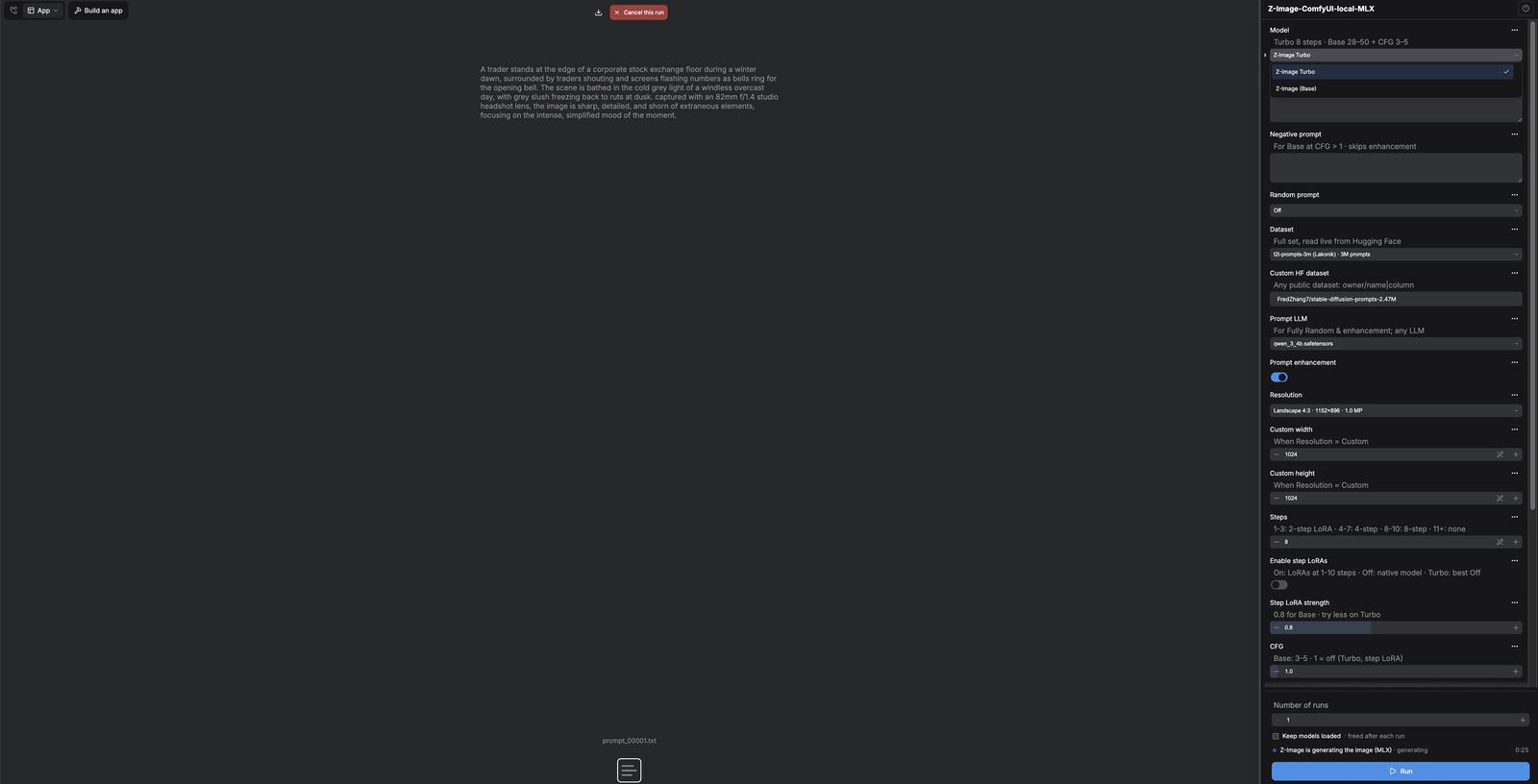
|
Z-Image/assets/thumbs/comfyui_local_mlx_002.jpg
ADDED

|
Git LFS Details
|
Z-Image/assets/thumbs/comfyui_local_mlx_003.jpg
ADDED

|
Git LFS Details
|
Z-Image/assets/thumbs/comfyui_local_mlx_004.jpg
ADDED
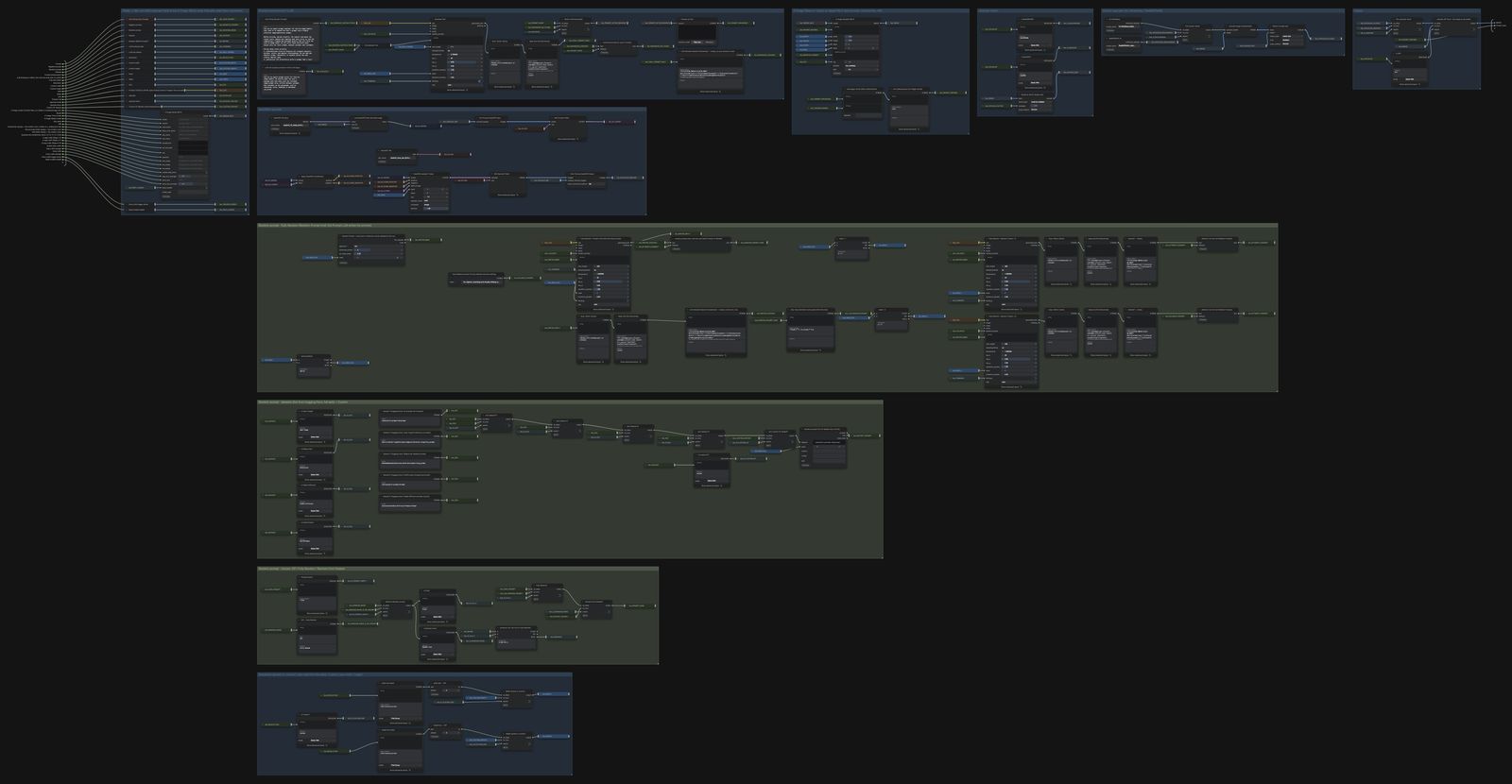
|
meta.yaml
CHANGED
|
@@ -1,7 +1,7 @@
|
|
| 1 |
# Project manifest. Also the file the Hugging Face Hub counts a download on, when the project is fetched with
|
| 2 |
# `hf download lvladikov/ComfyUI-Nodes-and-Workflows` (git clones aren't counted).
|
| 3 |
name: ComfyUI Nodes and Workflows
|
| 4 |
-
version: 2026.10.
|
| 5 |
author: lvladikov
|
| 6 |
homepage: https://huggingface.co/lvladikov/ComfyUI-Nodes-and-Workflows
|
| 7 |
license: Apache-2.0
|
|
@@ -13,13 +13,20 @@ requires:
|
|
| 13 |
- OneButtonPrompt # Cloud workflow only, built into Comfy Cloud; local workflows use LVNodes' Random Prompt
|
| 14 |
nodes:
|
| 15 |
LVNodes:
|
| 16 |
-
version: 2026.10.
|
| 17 |
path: LVNodes
|
| 18 |
models:
|
| 19 |
-
Krea-2
|
| 20 |
-
path: Krea-2
|
| 21 |
workflows:
|
| 22 |
-
- Krea-2
|
| 23 |
-
- Krea-2
|
| 24 |
-
- Krea-2
|
| 25 |
-
model_license: Krea 2 Community License (Krea-2
|
|
|
|
|
|
|
|
|
|
|
|
|
|
|
|
|
|
|
|
|
|
|
|
| 1 |
# Project manifest. Also the file the Hugging Face Hub counts a download on, when the project is fetched with
|
| 2 |
# `hf download lvladikov/ComfyUI-Nodes-and-Workflows` (git clones aren't counted).
|
| 3 |
name: ComfyUI Nodes and Workflows
|
| 4 |
+
version: 2026.10.05.2
|
| 5 |
author: lvladikov
|
| 6 |
homepage: https://huggingface.co/lvladikov/ComfyUI-Nodes-and-Workflows
|
| 7 |
license: Apache-2.0
|
|
|
|
| 13 |
- OneButtonPrompt # Cloud workflow only, built into Comfy Cloud; local workflows use LVNodes' Random Prompt
|
| 14 |
nodes:
|
| 15 |
LVNodes:
|
| 16 |
+
version: 2026.10.05.2
|
| 17 |
path: LVNodes
|
| 18 |
models:
|
| 19 |
+
Krea-2:
|
| 20 |
+
path: Krea-2
|
| 21 |
workflows:
|
| 22 |
+
- Krea-2-ComfyUI-cloud.json
|
| 23 |
+
- Krea-2-ComfyUI-local.json
|
| 24 |
+
- Krea-2-ComfyUI-local-MLX.json
|
| 25 |
+
model_license: Krea 2 Community License (Krea-2/LICENSE.pdf)
|
| 26 |
+
Z-Image:
|
| 27 |
+
path: Z-Image
|
| 28 |
+
workflows:
|
| 29 |
+
- Z-Image-ComfyUI-cloud.json
|
| 30 |
+
- Z-Image-ComfyUI-local.json
|
| 31 |
+
- Z-Image-ComfyUI-local-MLX.json
|
| 32 |
+
model_license: Apache-2.0 (Z-Image (Base), Z-Image Turbo, alibaba-pai's step LoRAs, UltraFlux); TAEF1 is MIT
|